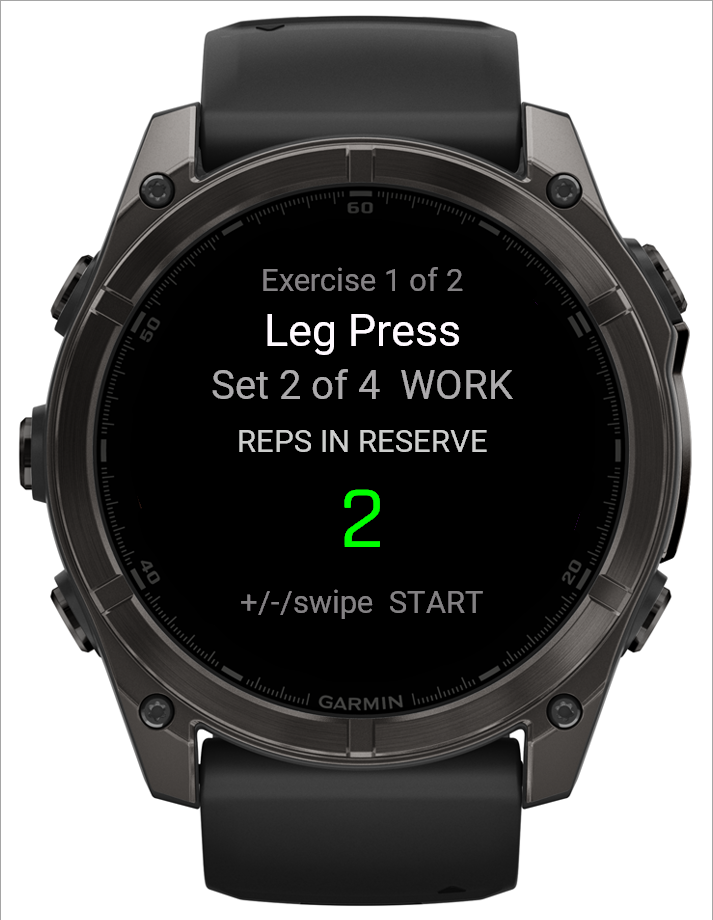
The reps-in-reserve screen on your watch
Only appears on sets your routine has configured to ask for it — right after you confirm reps, before the set is logged.
What this screen shows
The value starts on "--" (not recorded) unless you already entered one for this set. It's purely for your own reference; the coaching engine never reads it and it never blocks logging.
Step by step
- Use UP/DOWN (or swipe up/down) to move from "--" through 0–5 reps in reserve. Reversing direction below 0 returns to "--".
- START logs the set regardless of what's showing — even "--" — and moves to the rest timer (or the workout summary, after the last set).
- BACK returns to the reps screen for the same set.
 12
12- 1Reps in reserve: "--" until you set one
- 2START logs the set whatever is showing
Good to know
Nothing about this screen can go "wrong" — it's a note to yourself, not a number the app grades you on.
Related: What is RIR (reps in reserve)?, The reps screen on your watch.