The rest timer on your watch
Fills the gap between sets with a countdown, a preview of what's next, and enough control to adjust it on the fly.
What this screen shows
The header describes the UPCOMING set (the app has already moved the pointer forward), then the REST caption and countdown, then a NEXT preview of that set's weight and reps — skipped for cardio, which has its own screen instead.
Step by step
- Let it run out on its own — at zero it takes you to the set overview screen for the next set, with a vibration, and a shorter warning buzz at 15 seconds left.
- UP or swipe up adds 15 seconds; DOWN or swipe down removes 15. Shortening it all the way to zero ends the rest immediately, same as skipping.
- START or BACK both skip the rest right away and move on — neither one takes you back to the set you just logged.
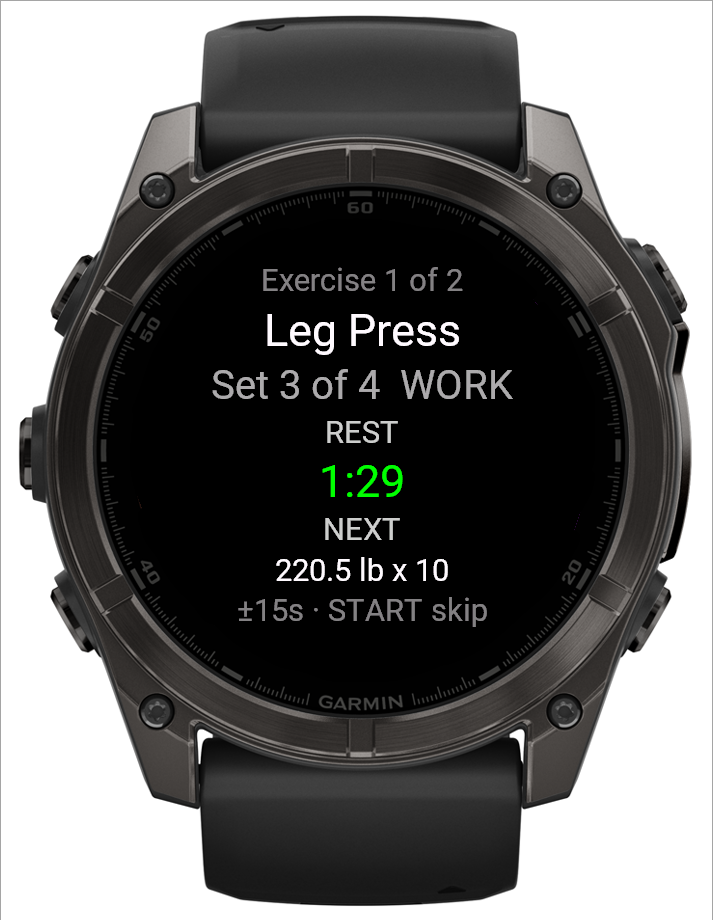 1234
1234- 1The upcoming set
- 2Countdown
- 3Next set's weight and reps
- 4UP/DOWN adds or removes 15 s; START skips
Good to know
The countdown is shared with your phone: if a workout is being logged from both devices, adjusting or skipping rest on one follows through to the other on its next update.
Related: Logging a workout, The set overview screen on your watch.