Logging a workout
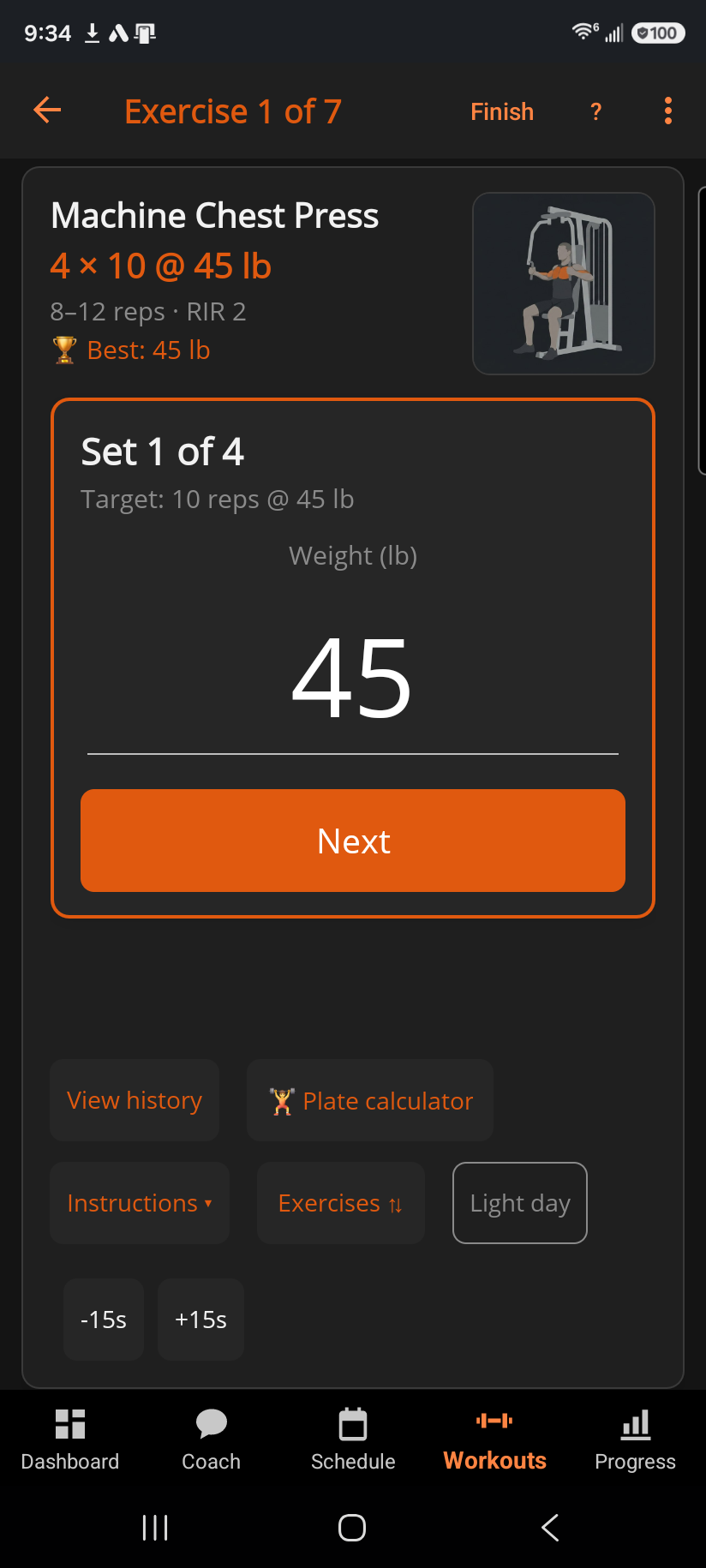
The active workout screen shows one exercise at a time, in a single card, so you always know exactly what to do next — whether you're logging from your phone or letting your watch drive the same session.
For each set, first confirm the weight — it's prefilled from your target, so most of the time you just tap Submit. Then enter the reps you got and tap Log set (the button reads Next instead if this set also asks for reps-in-reserve; see the RIR article below). If it does, pick 0–5 or — to skip it, then tap Log set. Rest starts automatically and counts down full-screen with Up next showing what's coming; skip it early, nudge it ±15 seconds, or tap Minimize ⌄ to shrink it to a pill so you can keep browsing the card underneath while it ticks down.
 1234567
- 1Finish & save when every exercise is done
- 2Sets x reps @ weight, the rep range, RIR
- 3Exercises: jump to another or reorder
- 4Light day marks the session as deliberately light
- 5Rest, adjustable in 15 s steps
- 6Weight, prefilled from your target
- 7Submit the weight, then enter reps
Move between exercises by swiping the card left or right, or tap Exercises ⇅ to open the full list — jump to any exercise, reorder what's left, or see what's done at a glance; a reorder reaches your watch too, so "up next" agrees on both devices. If your routine plans a drop set after this lift, it's already in the set list — no button needed. Need one more push on a set your routine didn't plan for? + Drop adds a drop set straight after the set you just logged: lower the weight and log it, then carry on with your remaining sets. One drop set can be waiting at a time. Building the workout as you go instead of following a routine? + Add exercise is always available, and anything you add mid-session shows up on your watch too if you're wearing one.
If an exercise needs equipment your gym doesn't have, a one-line banner above the set offers a substitute before you start it — a lift your gym can do, with the same sets, reps and rest. Tap it to pick one, or Not now to carry on as planned; see "Swapping an exercise your gym can't do" for how that works and what it does (and doesn't do) to your targets.
Light day, in the card's button row alongside Instructions, marks today's session as deliberately light. Tap it and every set logs the same way, it's just excluded from the automatic weight-and-reps advancement so going light on one day never costs you progress. It's the same idea as a full deload week, just for a single session.
Starting a plan BulkForged built for you? Your first session's weights are light on purpose — they're a starting point while your real numbers show up. Add reps each session; once you reach the top of your range, weight goes up and reps reset to the bottom. Fall short on one set of several and the target holds for next time. Fall short on more than one and it eases back a little, then climbs again as you beat it. For the full explanation, see "How progressive overload works."
A logged weight that lands slightly off your target — say a machine pin at 20.412 kg instead of an even 20 — isn't a mistake; see "My logged weight doesn't match my target." When you're done with every exercise, Finish & save takes you to your workout summary.
Related: Swapping an exercise your gym can't do, Using your Garmin watch, Why doesn't my logged weight match the target?, What is RIR (reps in reserve)?, Starting a workout off-plan (Quick Workout), Why didn't my target go up this session?, Workout summary, How do drop sets work?, How progressive overload works.