The set overview screen on your watch
Before every set, your watch shows what's coming: the exercise, the prescribed weight and reps (or, for cardio, the full segment breakdown), and a coaching cue if your routine has one.
What this screen shows
The header at the top always shows where you are — "Exercise X of Y", the exercise name, and the set number with WARM-UP or WORK (or, inside a superset, which partner's turn it is, e.g. "SS 1/2"). Below that:
- Strength work shows TARGET (with the prescribed reps-in-reserve appended when your routine asks for it, e.g. "TARGET · RIR 2"), the working weight and rep count, and any coaching cue attached to the exercise.
- Cardio shows the segment breakdown instead — each row like "1: 5.00 for 2:00" (speed and duration) — scrollable with UP/DOWN when it runs past what fits on screen.
Step by step
- Review the prescription (or scroll the cardio breakdown with UP/DOWN if it has more segments than fit).
- START begins the set: strength moves to the weight screen; cardio starts its first segment's timer immediately.
- MENU opens the exercise list to jump elsewhere in the workout.
- BACK opens the workout menu — resume, undo your last set, jump to another exercise, finish & save, or discard.
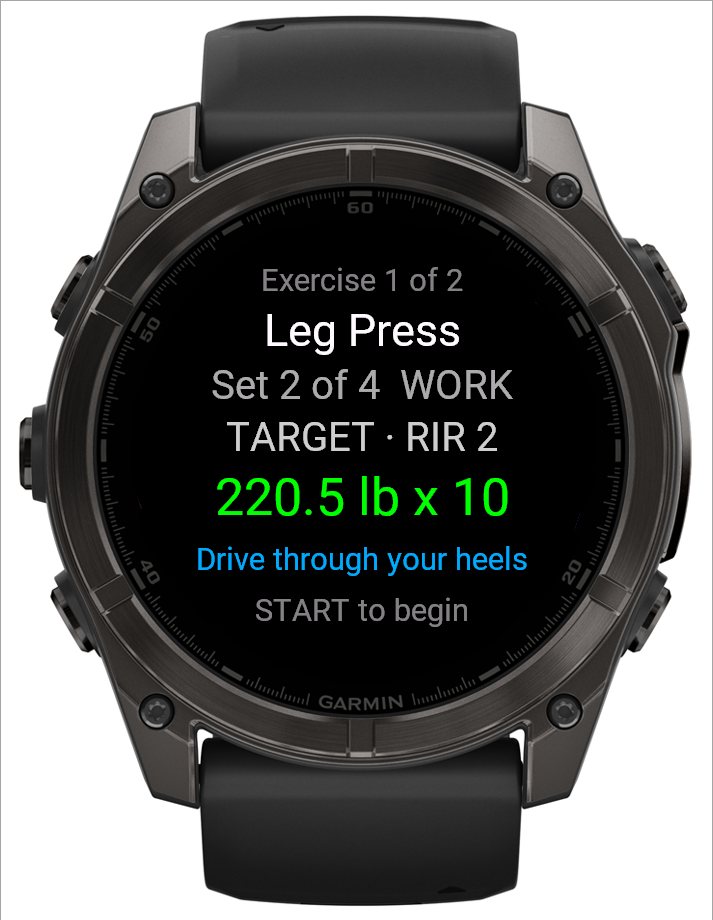 1234
1234- 1Where you are: exercise, set, warm-up or work
- 2The target, with RIR when the set asks for it
- 3Coaching cue from your routine
- 4What START does next
Good to know
This screen reappears between every set and after every rest period, so it's always the "home base" you land back on mid-workout.
Related: The workout menu on your watch, Logging a workout, The rest timer on your watch, Running cardio from your watch.