The weight screen on your watch
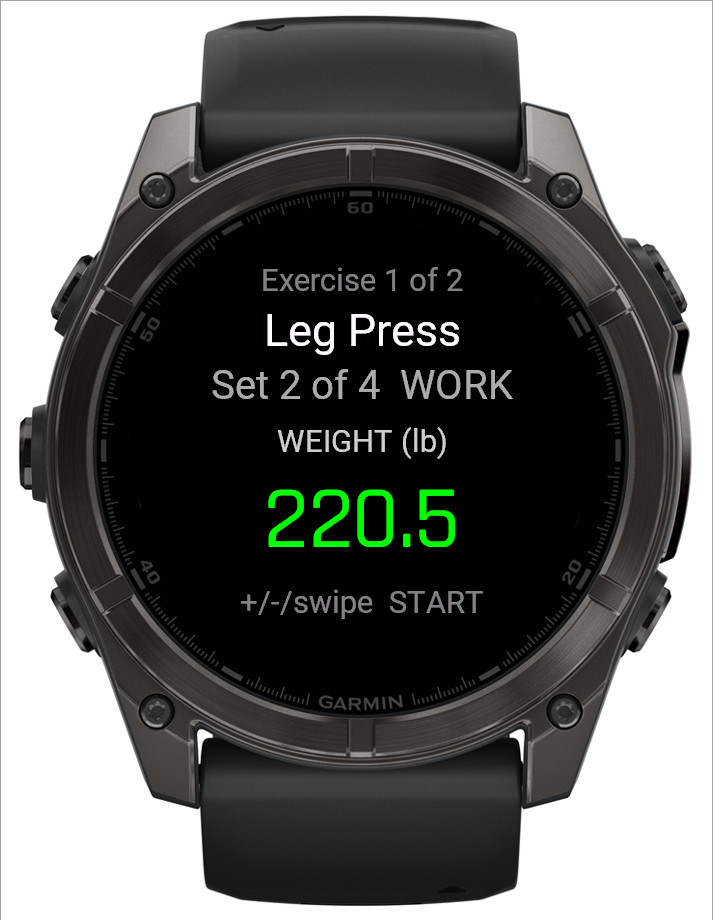
The first of two screens for logging a strength set: dial in the weight you're actually using before moving on to reps.
What this screen shows
The number starts on your prescribed working weight, in whichever unit (kg or lb) you display. Adjusting it takes effect immediately, so backing out to the set overview and returning later keeps whatever you'd already dialed in.
Step by step
- Use UP/DOWN (or swipe up/down) to adjust the weight. Presses or swipes close together ramp the step size — 0.5 → 1 → 2.5 → 5, the same magnitudes whether you're in kg or lb — so a big change doesn't take forever, while a single tap still gives fine control. Pausing or switching direction resets to the smallest step.
- START moves to the reps screen.
- BACK returns to the set overview.
 123
123- 1Exercise and set
- 2Weight, in your display unit
- 3UP/DOWN or swipe adjusts; START moves on
Good to know
A weight that doesn't land exactly on your target — a machine pin, say — is completely normal; see "Why doesn't my logged weight match the target exactly?".
Related: The reps screen on your watch, Why doesn't my logged weight match the target?, Logging a workout.