How do drop sets work?
A drop set is an extra, lighter set done right after a working set. Plan one in a routine or add one mid-workout.
A quick example
Your chest press has three working sets of 10 at 45 lb.
- You add a fourth row and set its type to Drop, 20% lighter.
- The app works out the weight for you: 35 lb, a weight the machine really has.
- Later your working weight goes up to 50 lb. The drop moves with it, to 40 lb.
Plan a drop set in a routine
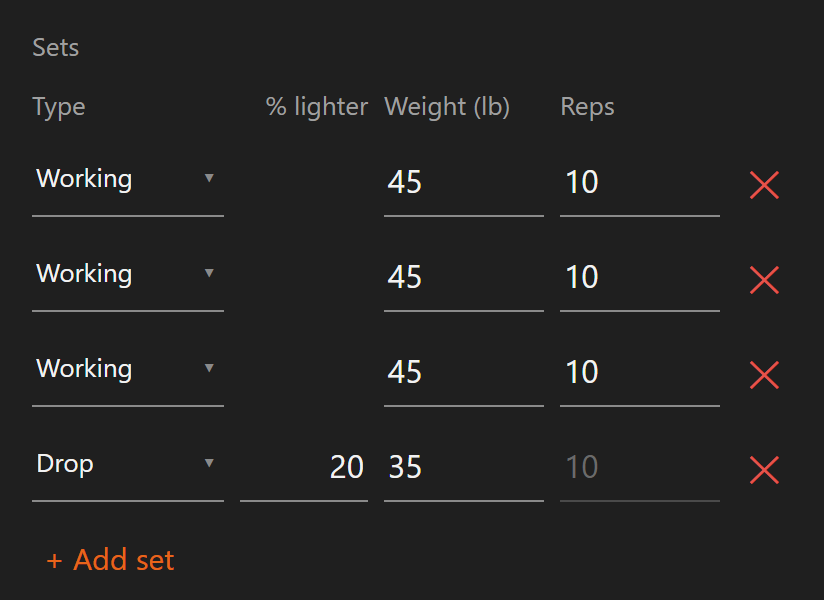
- Open the exercise in the routine editor.
- Tap + Add set, or pick an existing row.
- Set the row's Type to Drop.
- Enter how much lighter it should be under % lighter. It starts at 20.
Good to know:
- A drop can only follow a working set or another drop. It cannot be the first set or follow a warm-up.
- You can type a weight instead. The app turns it into a percent, so the drop keeps following your working weight.
- The drop uses the same reps as your working sets.
Add a drop set mid-workout
- Log at least one working set of the exercise.
- Tap + Drop on the set card.
- The app says "Drop set added. Lower the weight and log it." The new set starts at your last working weight.
- Lower the weight and log the set.
You can add one drop set at a time. Log it, and the button is ready for another.
What drop sets don't affect
- Progressive overload ignores them. Your targets move on working sets only.
- They don't count toward records or weekly volume.
- The exercise keeps one working weight, so overload keeps running on it.
Pyramids and other multi-weight exercises
A pyramid uses a different weight on every set. That is not a drop set.
- These are custom per-set exercises. You enter the weight and reps for each set.
- There is no single working weight to progress, so automatic progressive overload skips them.
- They are yours to tune by feel, set by set.
Related: Editing a routine exercise, Logging a workout, How progressive overload works.