Running cardio from your watch
The live screen for a cardio exercise: a running (or counting-up) clock, the prescribed machine settings, and your heart rate if it's available.
What this screen shows
The top line shows which segment you're on and its prescribed settings (speed, incline, level — whatever applies). The big number counts down a timed segment or counts up an open-ended one, turning gray while paused. Below that, either your live progress toward a distance goal (outdoor cardio) or a preview of the next segment's settings, and your heart rate in bpm when the watch can read it.
Step by step
- START pauses or resumes the clock.
- DOWN skips straight to the next segment.
- Timed segments auto-advance on their own — a lap vibration and tone cue mid-workout, and a stronger double-vibration and tone when you reach the last segment's goal. That last one is a cue, not a stop: the clock keeps counting, now upward, so if you want to keep going you just keep going. Reaching a distance goal works the same way, since real-world pace varies. Either way you end the exercise yourself from the menu.
- MENU or BACK opens the cardio menu: resume, finish this cardio exercise, skip to the next segment (interval cardio only), jump to another exercise, finish & save the whole workout, or discard it.
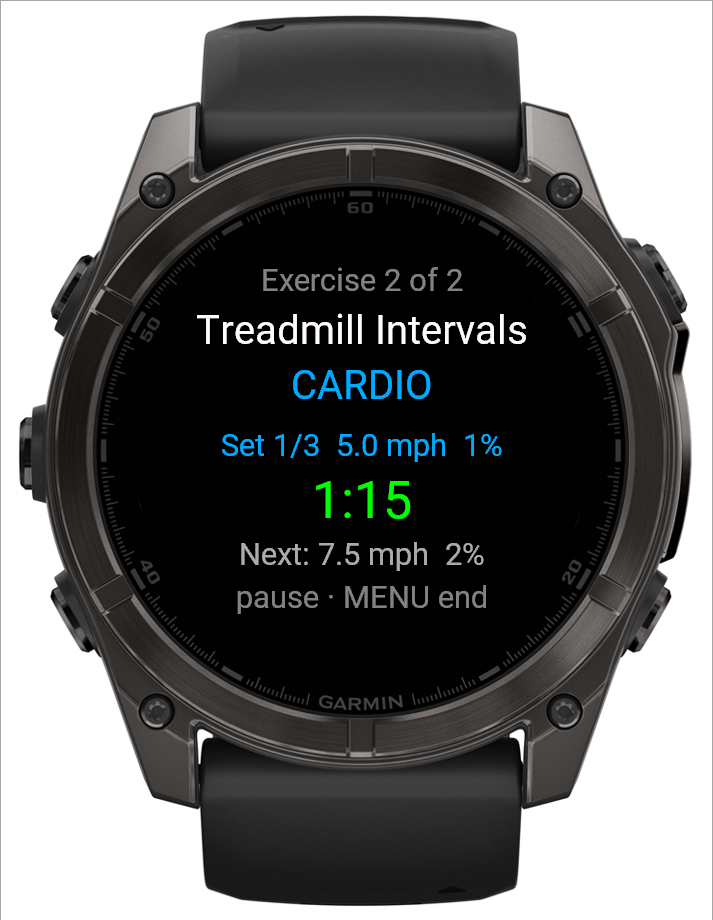 1234
1234- 1Segment and its prescribed settings
- 2Running clock
- 3Next segment's settings
- 4START pauses; MENU ends the bout
Good to know
If a workout is being run from both devices and the other one finishes this cardio exercise first, your watch hands off to the next exercise on its own — you don't need to do anything.
Related: Logging a workout, The set overview screen on your watch, The workout menu on your watch.