Pairing your watch to your account
Pairing happens entirely on the watch rather than through Garmin Connect's app-settings screen.
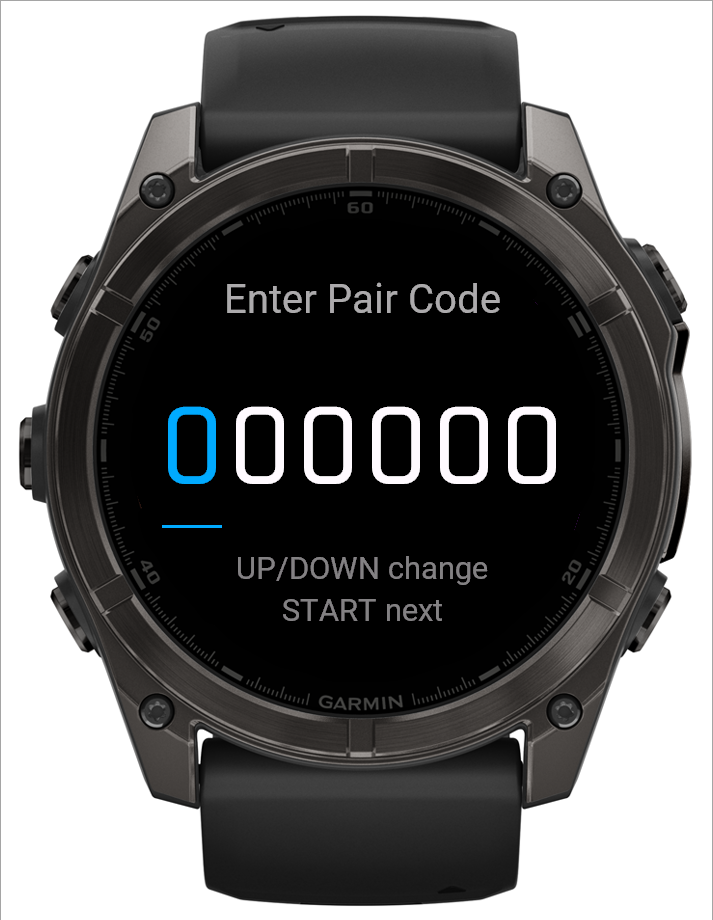
What this screen shows
Eight digits, entered one at a time, with the active digit highlighted and underlined.
Step by step
- On your phone, go to Settings → Account & watch → Pair your Garmin watch and tap Generate pairing code.
- On the watch, open BulkForged and choose Pair watch from the Start Workout menu.
- Use UP/DOWN (or swipe up/down) to set each digit, then START to move to the next one. START on the last digit submits the code.
- BACK steps back a digit; from the first digit it exits pairing entirely.
 12
12- 1The digit you're setting, underlined
- 2UP/DOWN change it, START moves to the next
Good to know
A rejected or unreachable code shows an inline error so you can retry without leaving the screen. Once it succeeds, the watch gets its own revocable token — there's no shared secret to leak, and re-pairing later never touches anything you've already logged.
Related: My Garmin watch stopped syncing, Account & watch.