Personal records
Every personal record you've ever set, in one searchable, filterable list.
What this page does
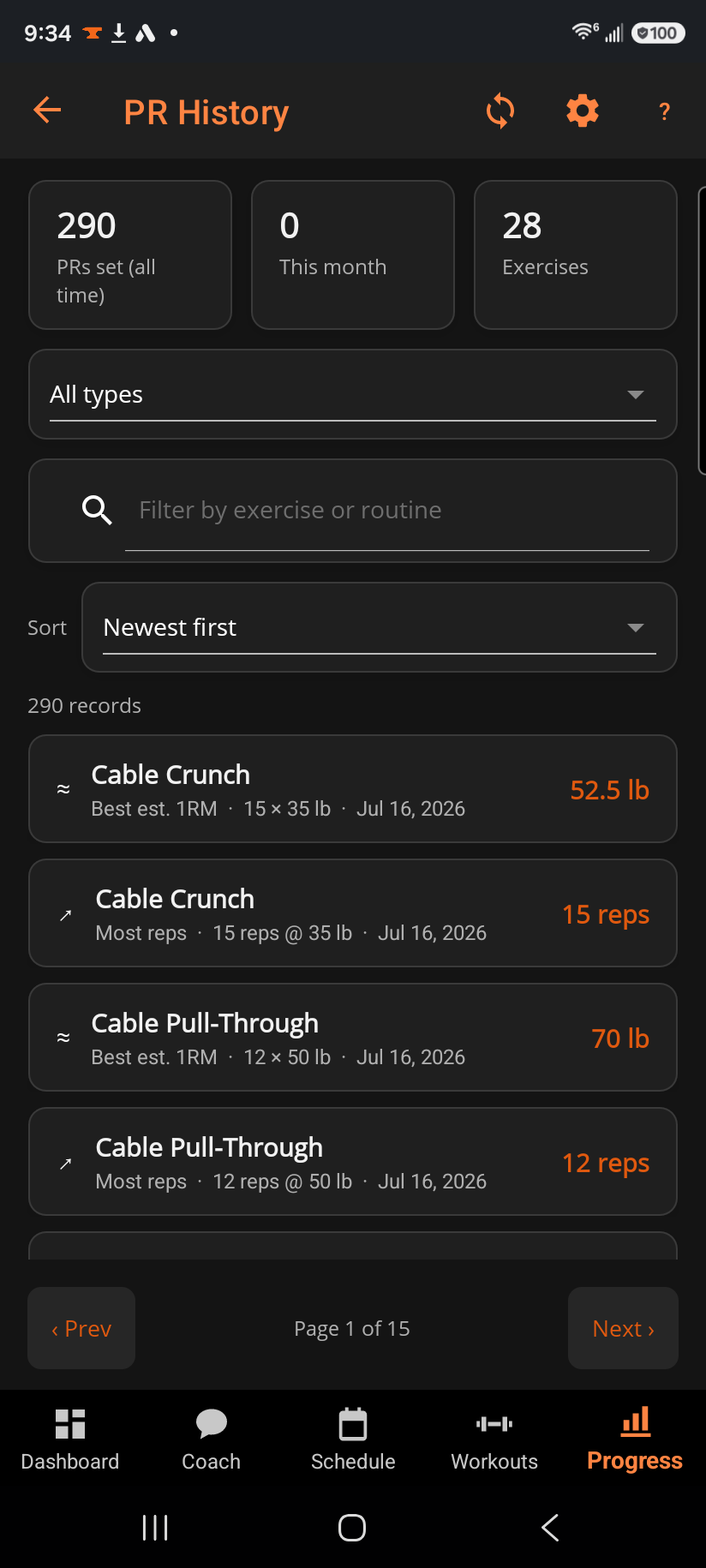
Three stats open the page — total PRs, PRs this month, and how many exercises you've PR'd on — followed by a filter, a search box, a sort picker, and the paged results themselves. Each row names the exercise, what kind of record it was, when it was set, and the number itself.
Step by step
- Use the type filter to narrow to one kind of record (e.g. heaviest weight, most reps).
- Search by exercise or routine name to jump straight to what you're after.
- Change Sort to reorder the list — newest first is the default.
- Tap any record to open that exercise's full history chart.
- Use ‹ Prev / Next › to page through a long list.
Good to know
Your estimated one-rep max is tracked here too — it has its own Best est. 1RM entry in the type filter, and its rows are marked with a quiet ≈ rather than a medal. That's the difference: an estimate is a training number BulkForged works out from your reps and weight, so it's tracked but never celebrated. It won't set off a celebration and it won't show up in the recent-PR strips on Dashboard or Progress — only weight you genuinely lifted does that.
Related: Progress — Records, Exercise history, Personal record celebrations, Attempt a record.