Routine detail
This is where a routine's exercises live — add, remove, reorder, group, and fine-tune each one, then save to publish the changes to your watch.
The muscle map at the top shows what this routine trains, and updates live as you edit the list below — add an exercise and its muscles light up immediately. Tap any exercise row to open its editor (sets, reps, weight, rest, and cardio settings all live there). Long-press the ≡ handle to drag a row into a new position; on a touch screen, swipe a row left to reveal Group ⧉, Ungroup, and Remove — on Windows, the same three actions sit as small buttons on the row instead, alongside ↑ ↓ to reorder without dragging.
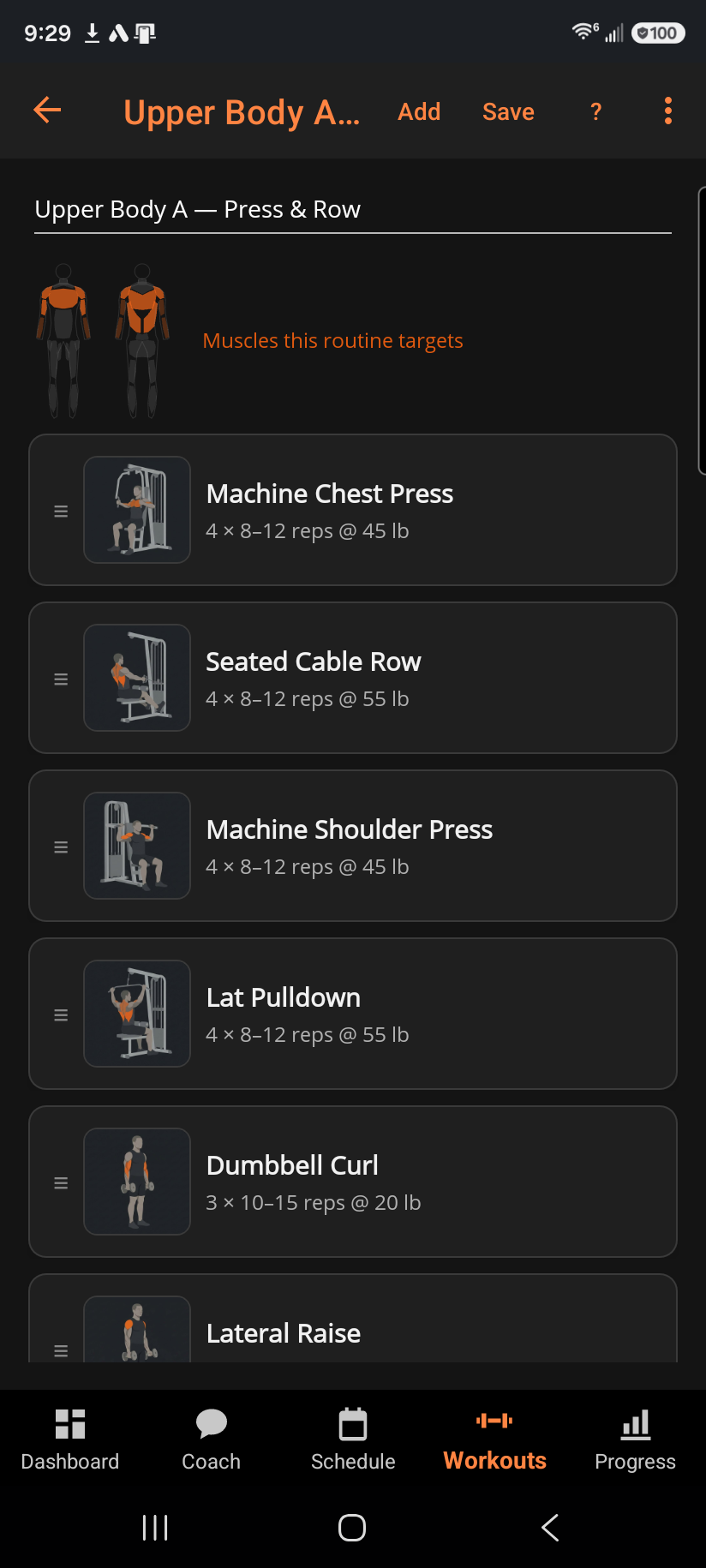
Group ⧉ pairs an exercise with the one immediately after it into a superset — see "What is a superset?" for how that changes the active workout. + Add exercise, from the toolbar or the list footer, opens the exercise picker.
Save writes your changes locally and republishes the routine to your watch — nothing is final until you tap it. Delete routine…, tucked in the overflow menu since it's destructive, removes the routine from your routines, your watch, and the schedule; any workouts you already logged with it stay in your history untouched, and the action can't be undone.
Related: Editing a routine exercise, What is a superset?, Picking an exercise, Workouts — Routines, Building a routine.