Progress — Trends
The Trends segment of the Progress tab is your training dashboard for the last 12 weeks — what you've done, how much, and where your body is headed.
What this page does
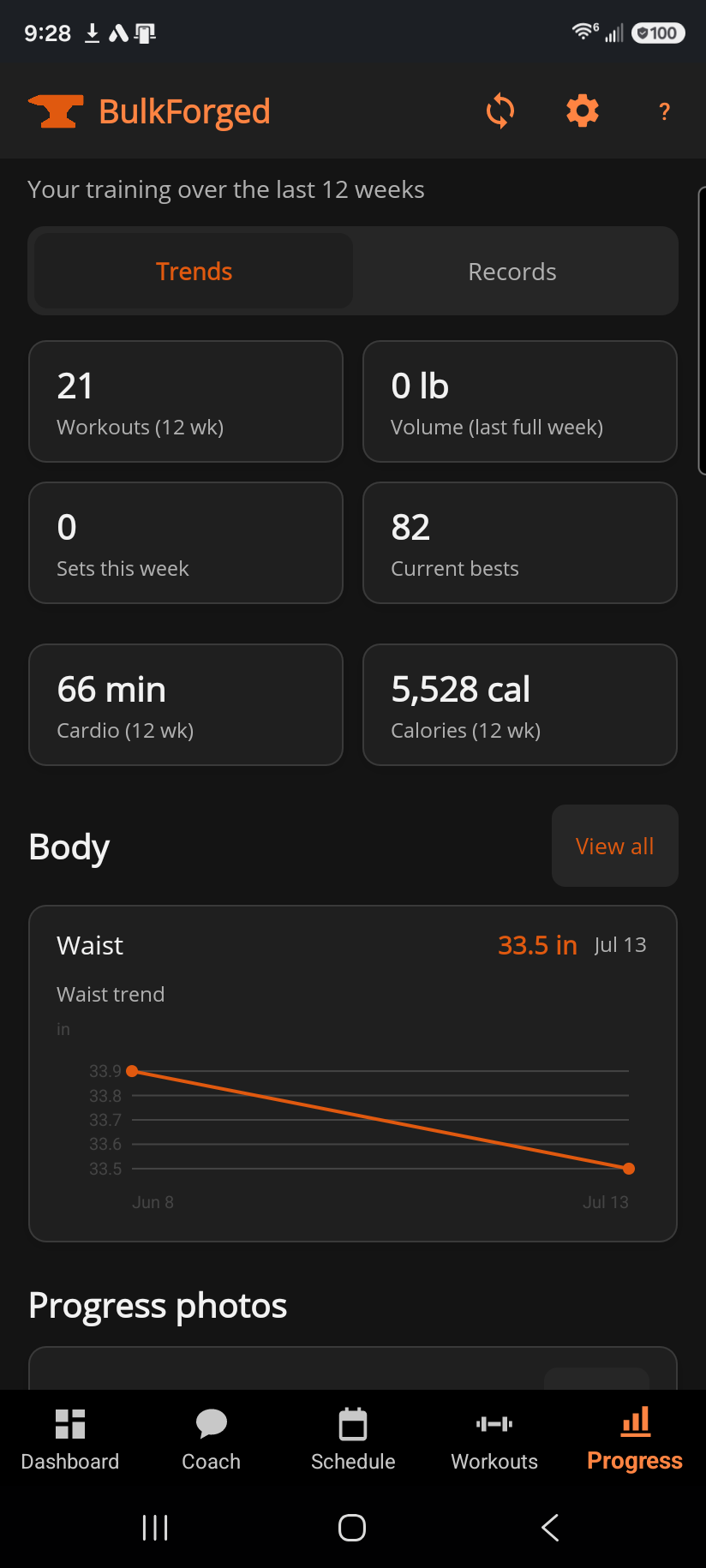
Four headline tiles open the page: workouts in the last 12 weeks, your volume for the last full week, sets logged this week, and how many current bests you're holding. Below that, cards fill in as you have data for them — cardio minutes and calories if you log cardio, your latest body measurements with a waist trend line, a shortcut into progress photos, a volume-over-time chart, your strength by muscle, and a rundown of your most recent progressive-overload target changes.
Step by step
- Open Progress from the tab bar — Trends is the default segment.
- Scroll for the fuller picture: cardio totals, body measurements, and photos sit above the coaching cards.
- View all next to Body opens your full measurement history; the same button under Progressive overload opens the full change log.
- Tap any progressive-overload row to see the full explanation for that one change.
Good to know
Volume-over-time, strength by muscle, and the progressive-overload summary are part of coaching. Without it, this page collapses those three into one card explaining that they pick back up the moment coaching is on — your workout counts, cardio, and body stats above stay free either way.
Nothing on this page ever reads as a miss: a target that held steady, not just one that went up, shows up here exactly as it happened, in the same even language as everywhere else in the app.
Related: Progress — Records, Body measurements, Progress photos, What is the Strength Score?, How progressive overload works, Overload history, Strength score.