Using your Garmin watch
BulkForged on your watch runs on the five buttons every supported Garmin has — fenix, epix, Enduro, MARQ and Forerunner alike — and the same button always means the same kind of thing, whichever screen you're on. Learn five buttons and you know the whole app.
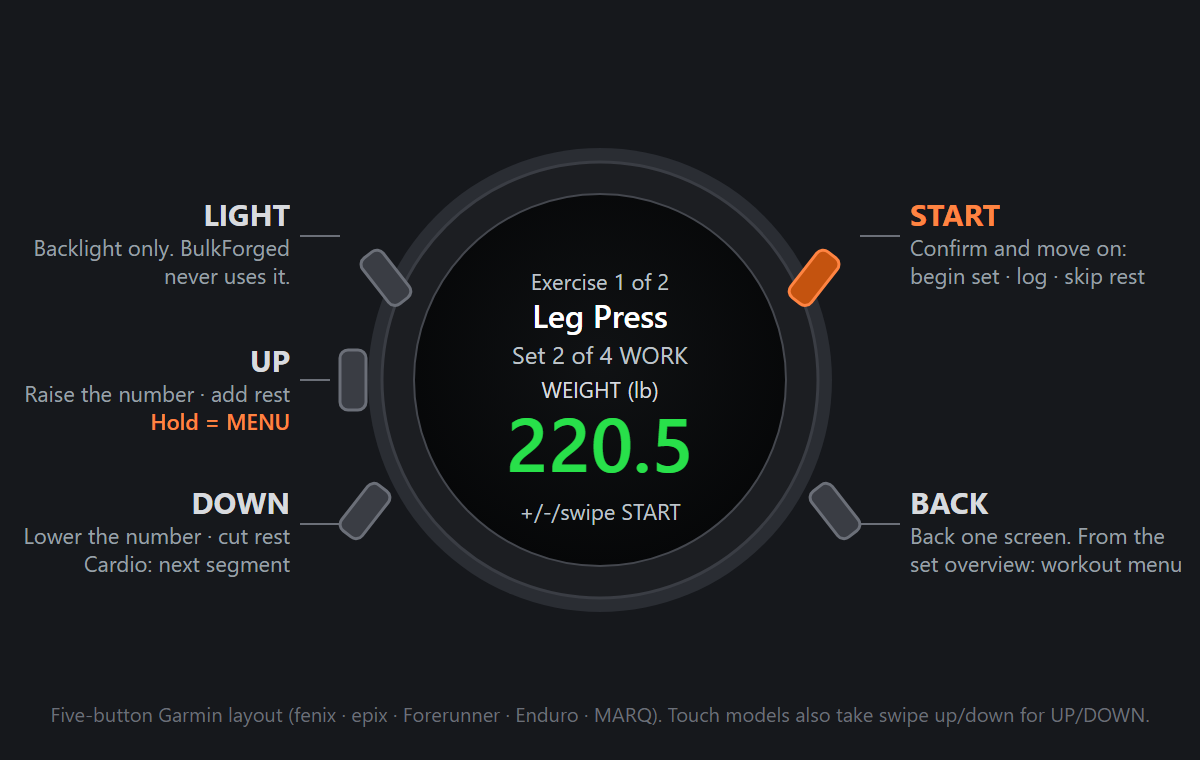
The buttons
- START (top right) — confirm and move on. It begins a set from the overview, moves from weight to reps, logs the set, and skips the rest timer.
- BACK (bottom right) — one screen back. From the set overview it opens the workout menu instead, because there is nothing behind the overview to go back to.
- UP (middle left) — raise the number on screen, or add 15 seconds of rest. Hold UP for MENU — there is no separate MENU key on these watches. From the set overview, MENU opens the list of exercises so you can jump to another one.
- DOWN (bottom left) — lower the number, take 15 seconds off the rest timer, or skip to the next cardio segment.
- LIGHT (top left) — the backlight. BulkForged never uses it.
Touch-screen models also take a swipe up or down as UP or DOWN. Swipe up always means "more" — heavier, more reps, more rest — so it feels the same as the button.
The screens, in the order you meet them
- Start Workout — pick a routine, resume one already running on your phone, or pair the watch for the first time.
- Set overview — what's coming: exercise, set number, target weight and reps. START begins the set.
- Weight — starts on your target; UP/DOWN adjusts it, and quick presses ramp the step from 0.5 up to 5 so a big change is a few presses, not fifty. START moves on.
- Reps — starts on your target rep count; UP/DOWN adjusts by exactly one. START logs the set (through the reps-in-reserve screen first, if that set asks for it).
- Rest — a countdown to the next set. UP/DOWN adds or removes 15 seconds; START or BACK skips it.
- Cardio — for a cardio exercise the overview leads to a running clock instead: START pauses and resumes it, DOWN skips a segment.
- Summary — after the last set: what you did, and that it's saved. START or BACK closes the app.
Each screen has its own article with the full detail — they're listed below in the same order.
Good to know
Anything you log on the watch syncs back to the phone the same way a session logged on the phone syncs out to the watch, so it doesn't matter which device you finish a workout on. If the watch stops syncing, it's almost always Garmin Connect needing re-authorization rather than anything in BulkForged.
Related: Pairing your watch to your account, Starting a workout from your watch, The set overview screen on your watch, The weight screen on your watch, The reps screen on your watch, The reps-in-reserve screen on your watch, The rest timer on your watch, Running cardio from your watch, The workout summary on your watch, The workout menu on your watch, My Garmin watch stopped syncing.