Which workout apps set your next weight?
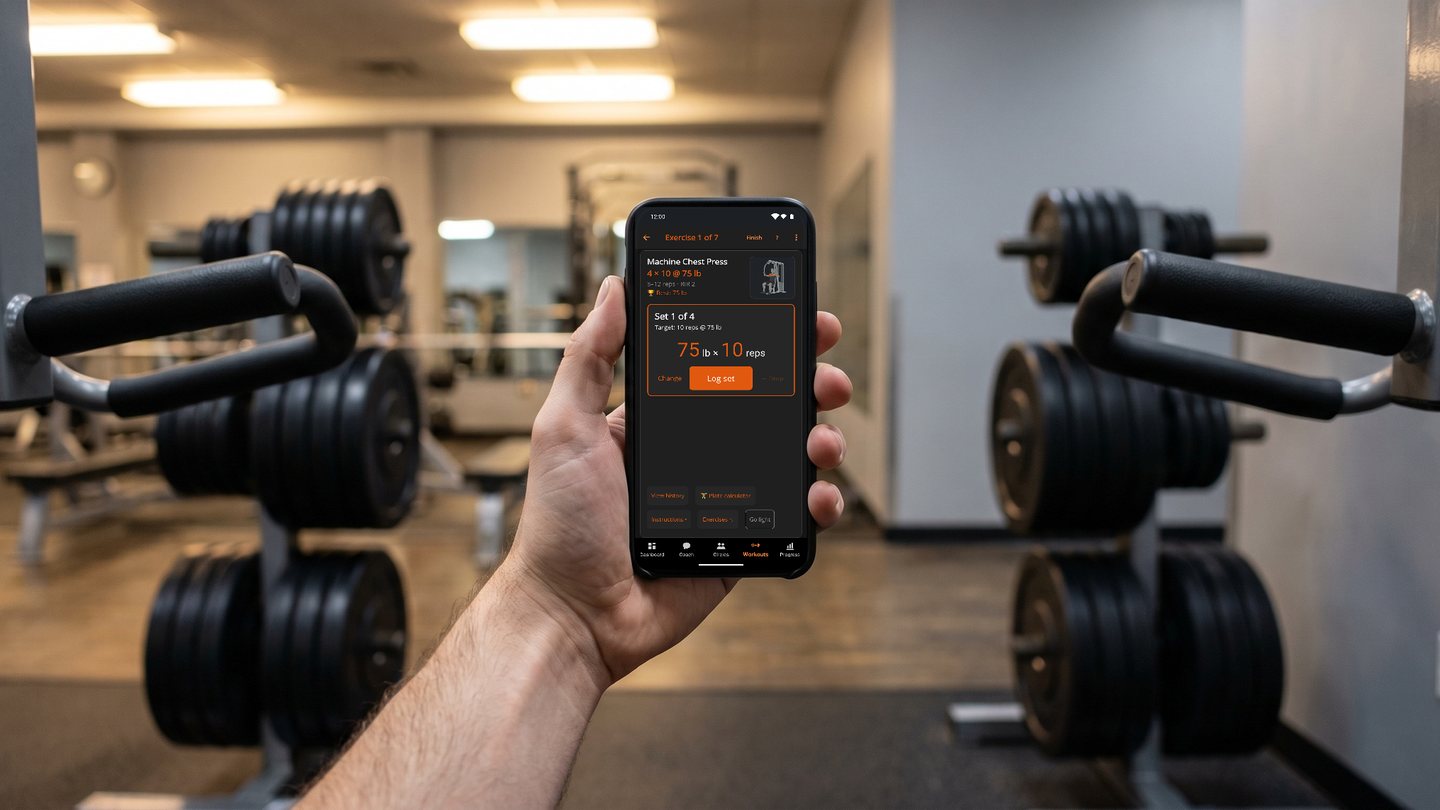
Most workout apps are logbooks, where you decide what to lift. A smaller group sets your next weight and reps, and this page compares how ten of them do it.
BulkForged works seamlessly with Garmin watches and remembers what you should lift next so you don't have to.
BulkForged is one of the ten. It raises targets by a published rule and logs why each one moved.¹
About this page
- BulkForged is our app, so weigh this page accordingly.
- Every statement about another product comes from that product's own website, read on 5 October 2026.
- That includes its help centre and its store listing.
- Where an app's own pages do not say, the table reads "Not stated".
What to compare
Each app below reads the sets you log and proposes the next ones. Five questions separate them.
- How is the next number set? By a published rule you can check, or by a private algorithm.
- Does it tell you why? A number with a reason is easier to trust on a bad day.
- Do you have to accept it? Some apps wait for a tap. Others update on their own. Check that you can overrule it.
- What does one bad session do? It might hold the target, lower it, or lower an estimate of your strength.
- Does it pick your exercises too? Some apps build each workout. Others keep the routine you built.
At a glance
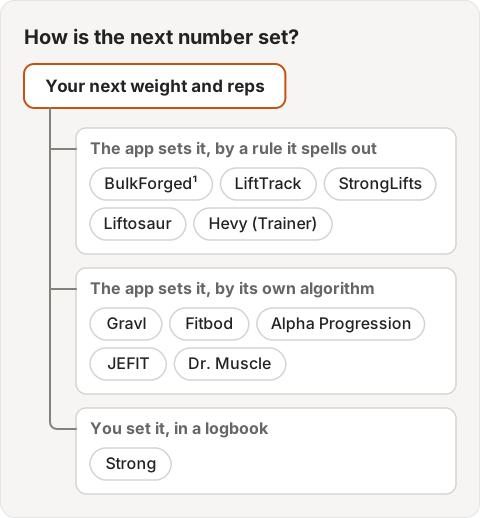
The first five spell out their rule. The next five use their own algorithms. Strong is a logbook.
| App | How the next weight is set | Tells you why | You accept it? | After a short session |
|---|---|---|---|---|
| BulkForged | Double progression¹ | Yes, a log names the sets¹ | No, it updates when you finish¹ | One short set among several holds¹ |
| LiftTrack | Linear or Double, per exercise | Shows each change, such as +5 lb | Yes, tap Accept | Held, same targets next time |
| StrongLifts | All sets done, then more weight | Not stated | No, it adds weight on its own | Weight repeats; drops 10% after 3 failed sessions |
| Liftosaur | Linear, Double, Rep Sum, or your own rule | Shows the rule's changes | No, it updates after the workout | Your rule decides |
| Hevy (Trainer) | Top of the range on every set, then weight | Not stated | Not stated | Not stated |
| Gravl | Algorithm: estimated 1RM and a rep ladder | Yes, Insights per weighted exercise | Not stated; you can edit its estimate | Lowers its estimate |
| Fitbod | Algorithm, from an estimated 1RM | For exercises; not stated for weights | Not stated; you can change weights | Eases future recommendations |
| Alpha Progression | Algorithm, from your past workouts | Not stated | Not stated; you can turn it off | May call for an easier set |
| JEFIT | AI, from your past workout logs | Not stated | No, it updates on its own | Holds on a sharp rep drop-off |
| Dr. Muscle | AI, from every rep and set | Not stated | No, it updates on its own | Suggests a deload when strength drops |
| Strong | You decide; no suggestion found on its site | Does not apply | Does not apply | Does not apply |
BulkForged
iPhone and Android, with Garmin and Apple Watch apps. See BulkForged for iPhone.
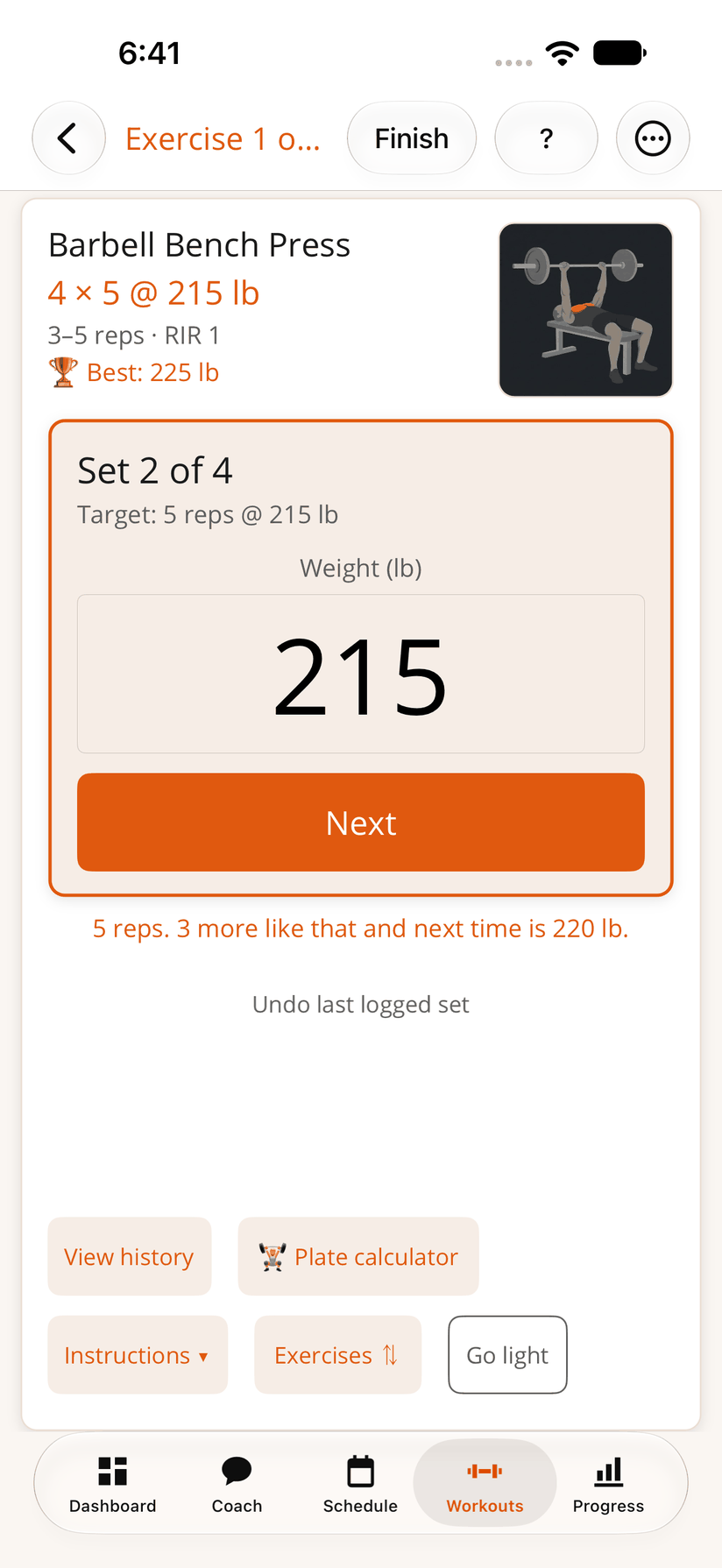
The rule is double progression, and it is published.
- Add reps until every working set reaches the top of the rep range. Then add weight.
- A worked example is in When should you add weight?
In the app:
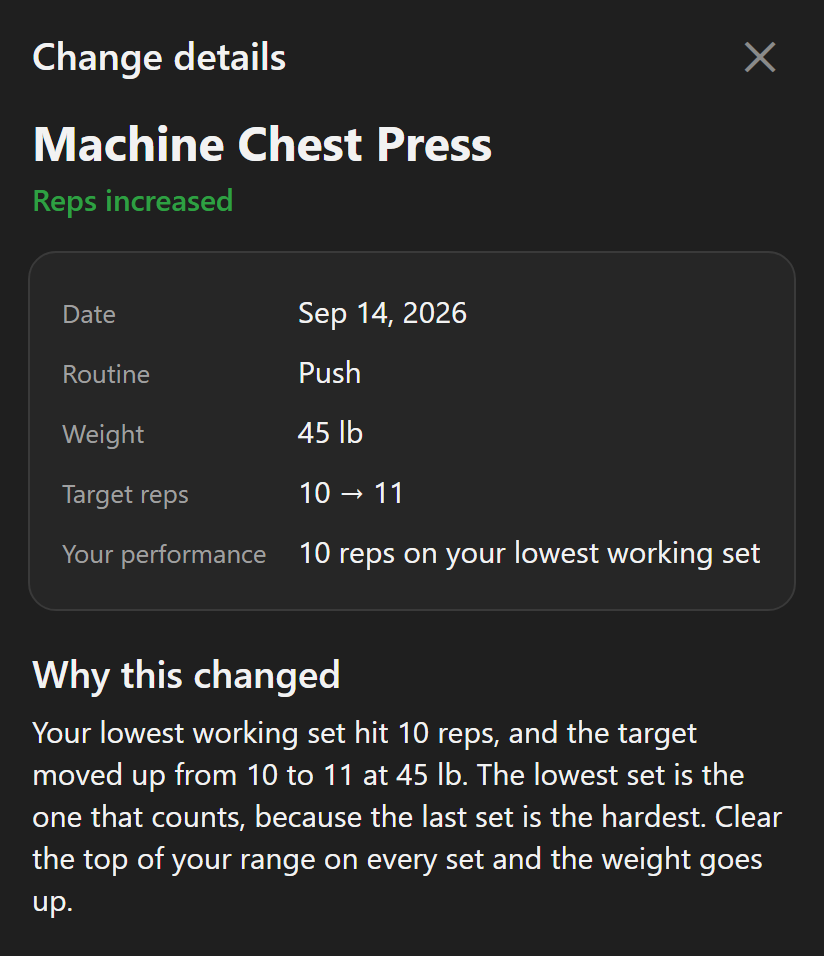
- Targets move after each workout by that rule.¹
- A new weight is rounded to a real machine or plate step.
- Targets update when you finish the workout. There is nothing to accept.¹
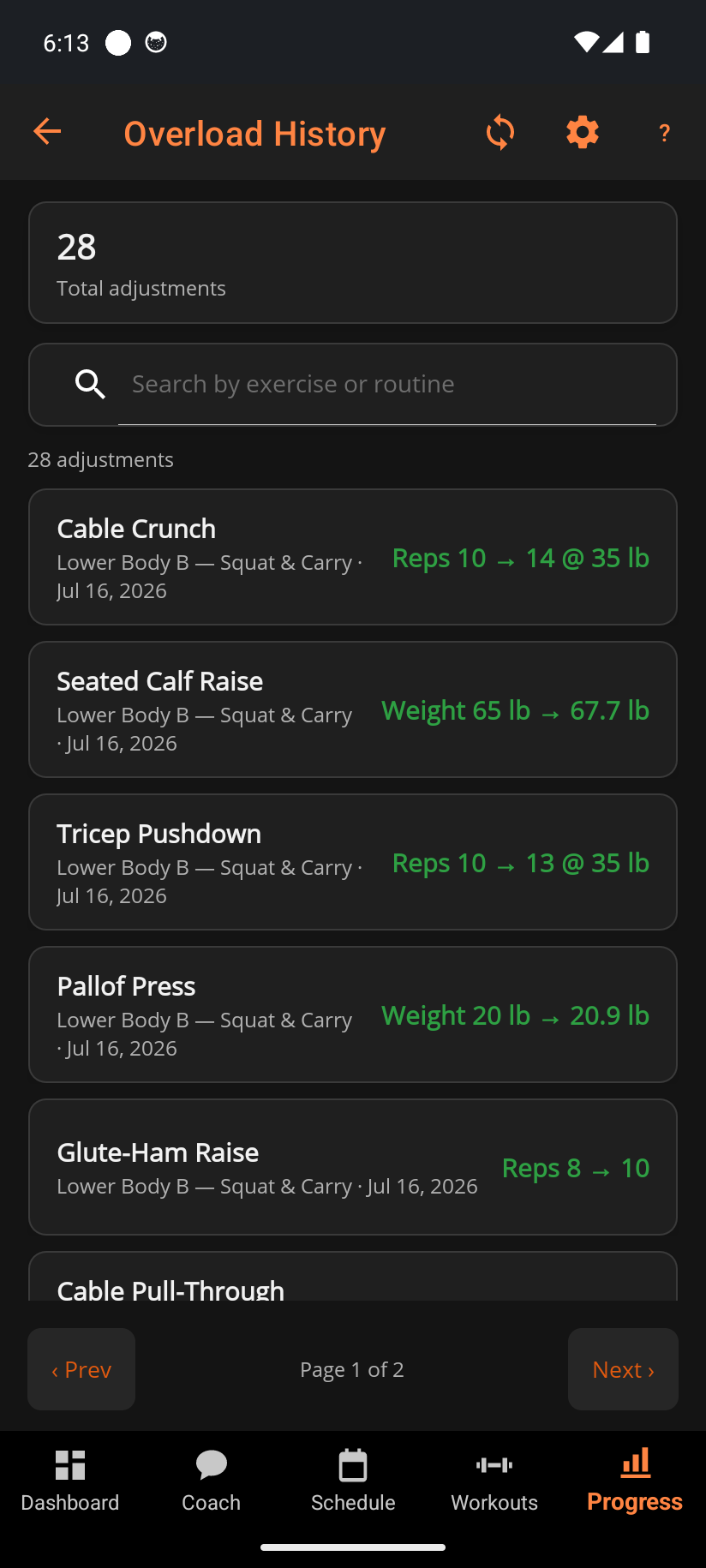
- Every change goes into a log, Overload History, that names the session and the sets it came from.¹
After a short session:
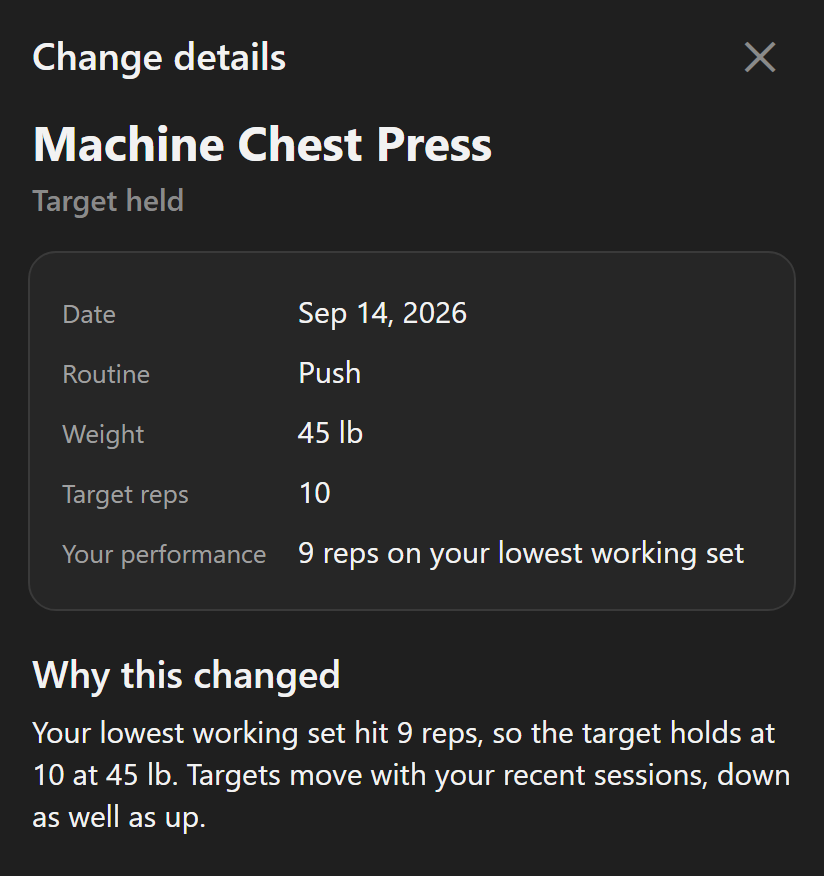
- One short set among several holds the target.¹
- The target eases only when two sets come in lower, or when the only working set does.¹
- A deload week lifts lighter without lowering your targets.
- More in Why didn't my target go up?
You stay in charge:
- Any target can be edited, and the app carries on from your number.
- It keeps your routine as you built it. It does not pick or swap exercises for you.
- Ready-made starter routines and named programs exist if you want one.
On a Garmin watch:
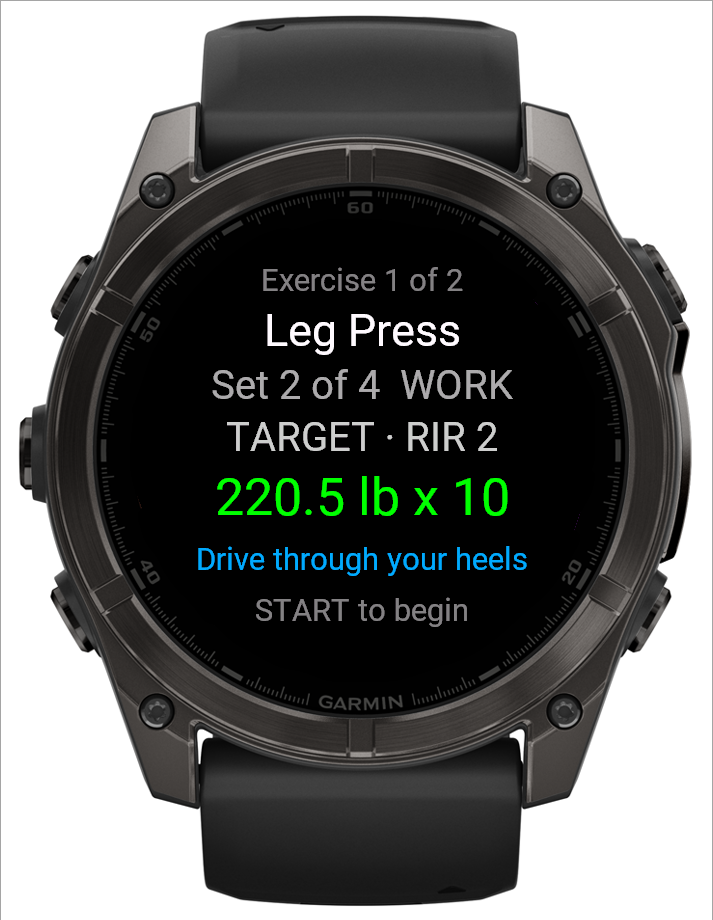
- The watch app shows the target weight and reps for each set.
- It runs the whole workout offline, so the phone can stay in the locker. See Phone in the locker.
- When you run a workout on your Garmin watch, it also saves to Garmin Connect with heart rate and calories. BulkForged keeps your sets and weights. More: what's saved where.
- It runs on 90+ Garmin watches. See every supported model.
- Pairing the watch needs a BulkForged account, but the phone app works without one.
Coming from Hevy or Strong? Import your history. Your workouts, routines, schedule and starting weights come across.
How BulkForged differs
- A rule you can check. Gravl, Fitbod, Alpha Progression, JEFIT and Dr. Muscle use their own algorithms. BulkForged's rule fits in one line, so you can check any target by hand.
- No Accept tap.¹ LiftTrack waits for you to tap Accept. BulkForged's targets update when you finish.
- One short set holds. Gravl lowers its estimate after a short session. Alpha Progression and Fitbod can ease the next one. In BulkForged, one short set among several holds the target.¹ LiftTrack holds too.
- Your routine stays put. Fitbod picks the exercises for each workout. BulkForged keeps the routine you built.
- A log of every change.¹ Gravl's Insights shows the sets behind today's weight. Overload History keeps every change, with its session and sets.
- The target on your wrist. The Garmin watch app shows each set's target and runs the workout offline.
LiftTrack
From LiftTrack's help page "How progressions work", updated 25 September 2026:
- A progression is a rule on one exercise. Linear adds a fixed weight. Double adds reps to the top of the range, then weight.
- You set the step. Linear starts at 5 lb (2.5 kg).
- After a session, a Next time screen marks each exercise as leveling up or held. A change reads like +5 lb or +2 reps.
- Accept applies the changes, and Skip keeps your current targets.
- One set short on reps or weight holds the exercise at the same targets next time.
StrongLifts
From StrongLifts' app page, its page on failed sets, and its help article "Progression Settings":
- It "automatically increases the weight for you over time if you complete all sets successfully."
- If you mark a set failed, the weight repeats next workout.
- By default, three failed sessions in a row on an exercise drop the weight by 10%.
- You choose how much weight it adds, how often, and when it lowers the weight.
- It shows which plates to load on each side of the bar.
Liftosaur
From Liftosaur's home page and its "Progressions and State" page, updated 29 September 2026:
- It has built-in Linear, Double and Rep Sum progressions, or you write your own rule.
- It "adjusts your program after every workout automatically."
- Under the sets, it shows what the rule will do, and Exercise Changes lists the new weights or reps.
- A Linear rule can also drop the weight after a number of failed sessions you choose.
- It rounds to the plates and bar you list, and shows the plates for each side.
Hevy
From Hevy's Hevy Trainer page, its help centre, and its page on previous workout values:
- In your own routines, a PREVIOUS column shows last time's weight and reps. Tap one to copy it into today's set.
- Hevy Trainer, a Pro feature, builds a program for you, with the exercises, sets and rep ranges.
- Trainer raises a weight only after you "hit the upper end of the rep range" on all prescribed sets.
- You can tell Trainer which plates and dumbbells you own.
- You can add, remove, swap or rearrange exercises in a Trainer workout.
Gravl
From Gravl's blog post "Inside the Gravl algorithm" and its help centre:
- Every set you log becomes an estimated one-rep max. Your Easy, Ideal or Hard rating steers the next weight.
- After a Hard session, the weight stays and one set gets one more rep. When every set reaches the target, the weight goes up one step.
- An Insights button on each weighted exercise shows the data behind today's weight.
- After a short session it "lowers its estimate". Deload workouts are left out, and each weight is snapped to what your gym can load.
- It builds each workout for you, and you can also build your own in a custom split.
Fitbod
From Fitbod's FAQ, its help centre, its blog and its App Store listing:
- Fitbod builds each workout, choosing the exercises as well as the weights.
- Its weight recommendations come from an estimated one-rep max.
- Its help centre says that if you "struggle with a set", it "eases future recommendations".
- It varies sets and reps on purpose, with heavier and lighter sessions.
- Its listing says Workout Insights explain why the exercises were picked. You can swap exercises and change weights.
Alpha Progression
From Alpha Progression's home page and its "Complete Alpha Progression Guide", dated 10 September 2026:
- Progression recommendations are a Pro feature, so the free version has none.
- Each working set gets a weight and a rep count. They come from past workouts, today's sets so far, and your gym's weights.
- When the next dumbbell is a big jump, it can add reps first.
- If you perform worse than expected, it says the next recommendation "may call for an easier set".
- Deload workouts change the recommendations. You can turn recommendations off.
JEFIT
From JEFIT's App Store listing and its blog post on its Load Progression feature:
- Its listing says the AI reads "your past workout logs" to suggest the next weight and reps.
- The listing puts this under JEFIT Elite, its paid tier.
- The blog says it reads the quality of your working sets and your rep patterns. Then it "updates your next session automatically".
- A sharp drop in reps reads as fatigue, and progression holds.
- You can build your own workouts or follow its programs.
Dr. Muscle
From Dr. Muscle's home page, its App Store listing and its article on progressive overload:
- Its site calls it an AI "Pocket Personal Trainer", "built by an exercise scientist".
- It picks the reps for the day, then "computes your weights automatically".
- It asks how hard your sets are, and adjusts the next sets and reps.
- It suggests a deload when your strength goes down. When it detects you need to recover, it cuts your sets in half.
- It builds a program from your age, goals and experience, or you add your own workouts.
Strong
From Strong's website and its App Store listing:
- Its listing describes your own routines, statistics and a plate calculator.
- We found no automatic next-weight suggestion on either page.
- The listing says Strong is "optimized for a progressive barbell routine such as Starting Strength or StrongLifts 5x5".
Where other apps do more
- Your own plates. Gravl snaps each weight to the plates or dumbbells you own. Hevy Trainer and Alpha Progression also use your gym's weights.
- Your own rule. Liftosaur lets you write the progression yourself. LiftTrack and StrongLifts let you set the step.
- A workout built for you. Fitbod, Gravl, Alpha Progression, Dr. Muscle, LiftTrack and Hevy Trainer can build workouts for you.
- Changes inside the workout. Alpha Progression also reads the sets you did earlier that day. Dr. Muscle adjusts the next sets from how hard you rate them.
What to check before you choose
- Can you see why a target moved? A number with no reason is hard to trust on a bad day.
- What does one bad session do? Look for whether it holds the target, lowers it, or lowers an estimate.
- Do you have to accept each change? An Accept tap gives you control. It also adds a step after every workout.
- Can you load the number? Machines have fixed pins. A target you cannot load is useless.
- Does it pick exercises, or only weights? Some lifters want variety, and others want the same lifts every week.
- Does it run on your watch? Check your model against the app's own list. See the Garmin lifting apps, compared.
¹ Part of Coaching, the paid plan. Every install starts with 14 days of it free, with no card.
Related: How progressive overload works, Why didn't my target go up this session?, Overload history, What coaching includes.

More guides
- Best strength training and lifting apps for Garmin watches
- Does Hevy work with Garmin?
- Does the Strong app work with Garmin?
- Does StrongLifts work with Garmin?
- Does Fitbod work with Garmin?
- Does JEFIT work with Garmin?
- Does Caliber work with Garmin?
- Does Boostcamp work with Garmin?
- Does the Ladder app work with Garmin?
- Gravl vs BulkForged on a Garmin watch
- LiftTrack vs BulkForged on a Garmin watch
- How to log a gym workout on a Garmin watch
- Why your Garmin miscounts reps
- When should you add weight?
- How many sets per muscle per week?
- How to keep muscle while losing weight
- Which Garmin watches run BulkForged?
- Switching to BulkForged from Hevy or Strong
- One gym workout on a Garmin watch, press by press
- Questions to ask before you install
- BulkForged for iPhone
- BulkForged and Garmin Connect: what's saved where
- How the watch and phone stay in sync during a workout
- Phone in the locker, workout on your Garmin
- Machine taken? Skip to another exercise
- How to track progressive overload on a Garmin
- Why Garmin Strength Coach skips some weights
- Garmin Strength not saving weights? The fixes
- Which Garmin watch is best for lifting?
- BulkForged on the fēnix
- BulkForged on the epix Pro
- BulkForged on the Forerunner
- BulkForged on the Instinct 3 AMOLED
- BulkForged on the Venu
- BulkForged on the vívoactive
- BulkForged on the Instinct
- Setting up a new Garmin for the gym
- Starting to lift this year