How do I track progressive overload on a Garmin watch?
Your Garmin records every set, but its Strength activity won't carry last session's weights forward or raise them. Update your workouts by hand, follow a Garmin Coach plan, or use a Connect IQ app that sets your targets.
Which ways of tracking progression work on a Garmin?
| Feature | Garmin Strength activity | Garmin workout with weights typed in | BulkForged watch app |
|---|---|---|---|
| Shows the weight to lift | No, you enter it after the set | Yes, the number you typed | Yes, before every set |
| Next session's weight | You decide | The same, until you edit it | Set from your sets, with Coaching |
| Explains a change | No | No | Yes, a reason for each one |
| Reps | Counted from wrist movement | Counted from wrist movement | You confirm them |
| Cost | Free | Free | Free to log; auto targets are paid |
Garmin Coach strength plans are a fourth route. They set and update weights for the main lifts only.
What does Garmin record during a Strength activity?
Garmin's fēnix 8 owner's manual covers this in "Recording a Strength Training Activity". We read it on 4 October 2026.
- You start Strength from the Gym activities, either free or following a workout.
- The watch counts your reps from wrist movement.
- After each set, you can edit the reps and the weight you used.
- You can build a workout in Garmin Connect and send it to the watch.
It records what you did. It does not work out what to lift next time.
Why don't my weights carry forward to the next session?
Garmin's watches don't offer this today. Garmin said so on its own forum.
- A thread there is titled "How do you track progressive overload in Connect? (weights/reps don't carry forward between strength sessions)".
- A Garmin team member replied: "we do not actively have this feature available on our watches".
- They asked owners to send the request through Garmin's ideas form.
We read that thread on 4 October 2026. Two more threads show related gaps:
- In "Garmin workout weight progression and benchmark exercises", an owner logged a heavier weight. The watch still suggested the first one next time.
- Another thread had 9,227 views when we read it. Its title: "Does anyone know a better way to log strength training data for progressive weights?"
- Its starter could not vary the weight from set to set, so they added the exercise once per set.
How do lifters work around it?
Ideas from Garmin's forums, read on 4 October 2026:
- Edit the workout each week. Change the weights in Garmin Connect before you train, then send it to the watch again.
- Adjust on the watch. One owner sets a starting weight and changes it after each set. They say it takes about three seconds on an epix.
- Use step notes. Some lifters type last week's numbers into each step's note.
- Check the phone. One owner notes that Garmin Connect's Reports chart each exercise's weight and reps over time.
- Follow a Garmin Coach strength plan. Its main lifts get a weight from your benchmarks.
- Use a Connect IQ app. The app shows a target before each set and sets the next one for you.
Does Garmin Coach set the weights for you?
For the main lifts, yes.
- Garmin describes its Coach plans as free in the Garmin Connect app.
- A Garmin team member wrote on Garmin's forum that only the "primary lifts" get a suggested weight.
- Bench press and squat are Garmin's examples. Their weight comes from benchmarks you set, which update as the plan goes on.
- Accessory lifts get no weight. See Why does Garmin Strength Coach not give me weights?
Sources: Garmin's blog post "Five ways to use Garmin Coach on your watch" (22 September 2025) and Garmin's forum. We read both on 4 October 2026.
How does BulkForged show the next target on the watch?
BulkForged is our app. Its watch app installs from the Connect IQ store.
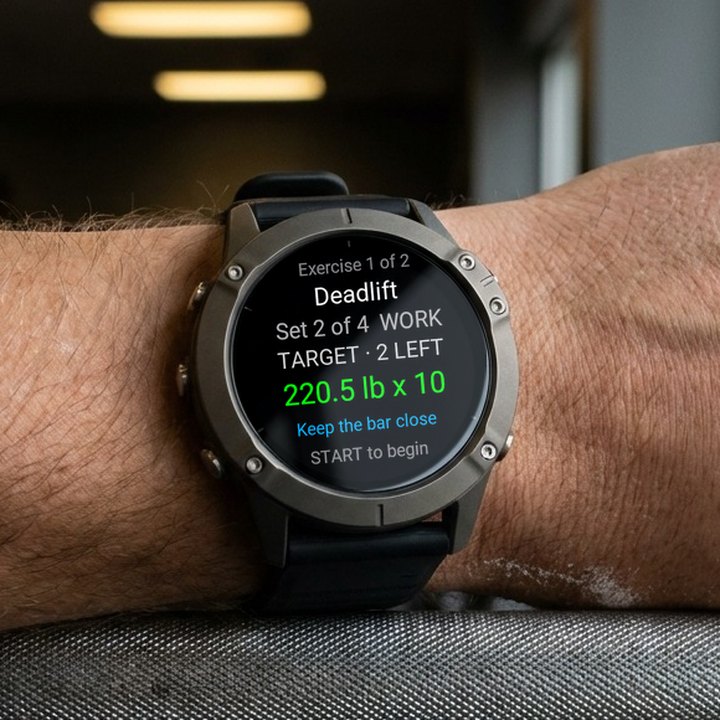
- Before each set, the watch shows the exercise, the set number, the target weight and the target reps.
- After the set, you confirm the weight and the reps. Reps start at your target.
- The watch runs the whole workout offline. It uploads the workout when it has a connection.
- With Coaching, the app on your phone then works out your next targets and sends them to the watch.
How does BulkForged decide the next target?
It uses double progression: reps first, up to the top of your rep range, then weight.
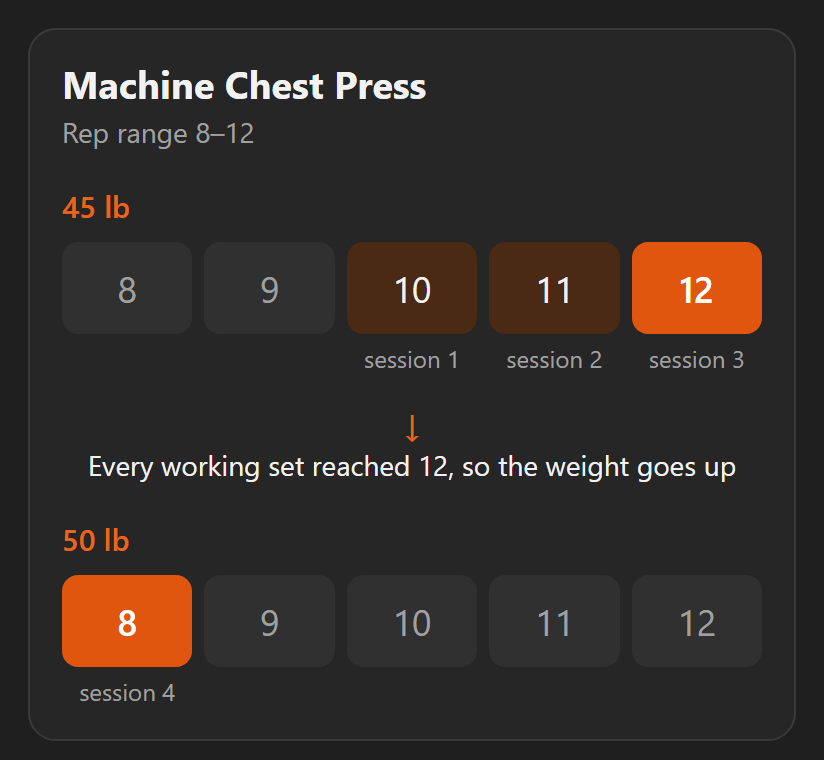
- Each exercise has a rep range, such as 8 to 12.
- Your lowest working set decides. The last set is the hardest, so that is the one that counts.
- Most of the time, the next target is one rep above that set.
- When every working set reaches the top of the range, the weight goes up. Reps go back to the bottom.
- The new weight is rounded to a step your equipment has, such as the next pin.
- One short set among several does not lower the target.
The full rule, with an example: When should you add weight?
Can I see why a target changed?
With Coaching, yes. Every change is written to a log on your phone.
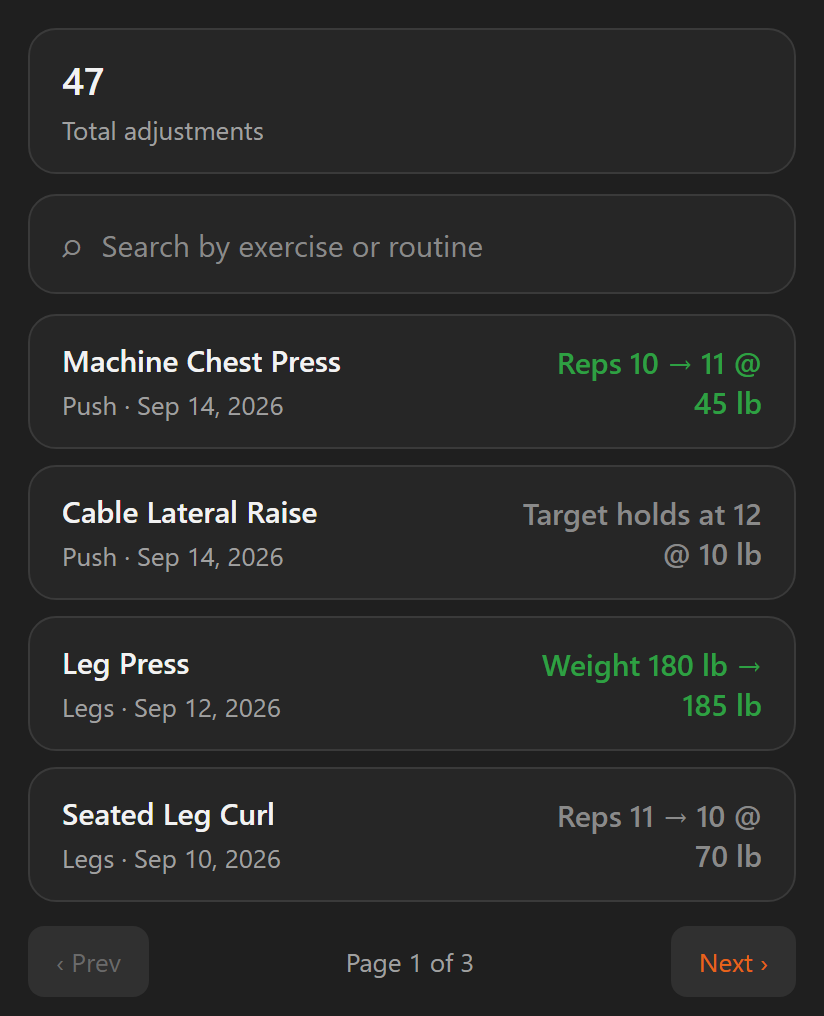
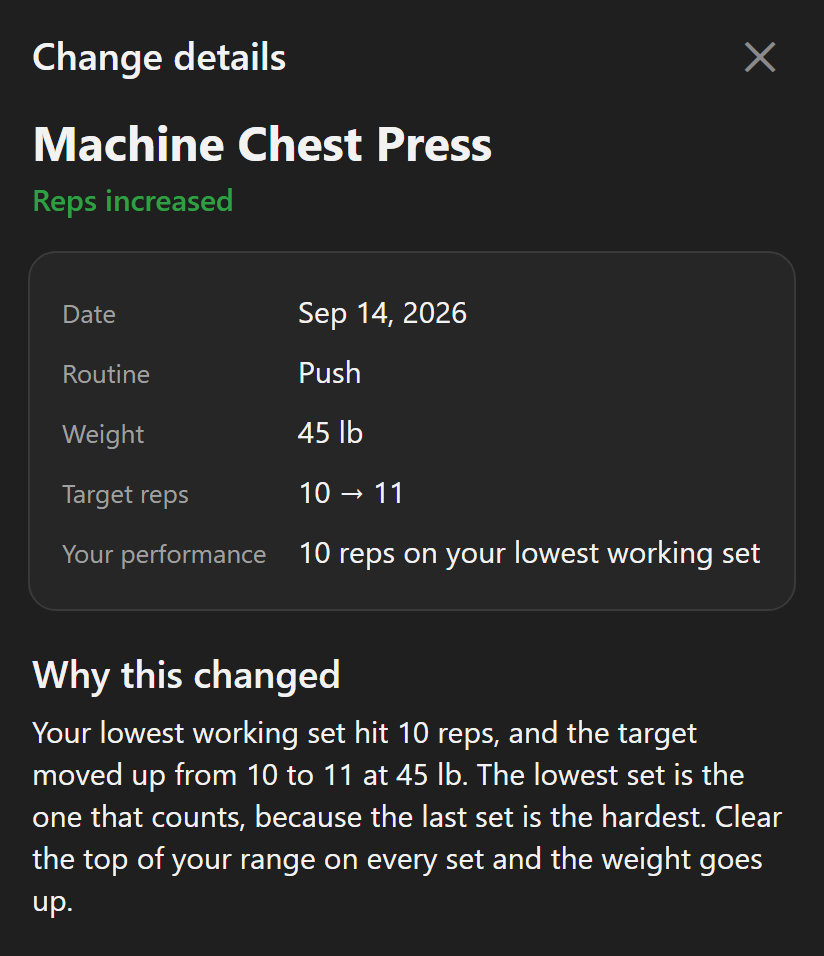
- Overload History lists every change, newest first. Targets that held are listed too.
- Tap a row to see the weight, the target reps before and after, and your lowest set.
- A short "Why this changed" note explains the decision in plain words.
- You can edit any target. The app carries on from your number.
Is automatic progression free in BulkForged?
No. Automatic targets and the change log are part of Coaching, the paid plan.
- Coaching is open for your first 14 days at no charge.
- Basic stays free. It logs every workout on the phone or the watch, and keeps your history, routines and records.
- Without Coaching, the watch still shows your targets. They stay where they are until you change them.
What Coaching adds, in full: What coaching includes.
What are BulkForged's limits?
- Android only today. iPhone users can join the waitlist.
- It runs on 60+ Garmin watches. No Venu or vivoactive. See every supported model.
- Pairing the watch needs a BulkForged account. The phone app works without one.
- A BulkForged lifting session is saved in BulkForged, not as a Garmin Connect activity.
Related: How progressive overload works, Overload history, Progressive overload change detail, The set overview screen on your watch.
Get BulkForged on Google PlayMore guides
- Best strength training apps for Garmin watches
- Does Hevy work with Garmin?
- Apps that raise your weights automatically
- How to log a gym workout on a Garmin watch
- Why your Garmin miscounts reps
- When should you add weight?
- How many sets per muscle per week?
- How to keep muscle while losing weight
- Which Garmin watches run BulkForged?
- Switching to BulkForged from Hevy or Strong
- One gym workout on a Garmin watch, press by press
- Questions to ask before you install
- BulkForged and Garmin Connect: what's saved where
- How the watch and phone stay in sync during a workout
- Phone in the locker, workout on your Garmin
- Machine taken? Skip to another exercise
- Why Garmin Strength Coach skips some weights
- Fix Garmin Strength weights, names and sets
- Which Garmin watch is best for lifting?
- BulkForged on the fēnix 9
- BulkForged on the fēnix 8
- BulkForged on the epix Pro
- BulkForged on the Forerunner 970
- BulkForged on the Forerunner 965
- BulkForged on the Instinct 3 AMOLED