Does BulkForged work on a Garmin Instinct?
On most current ones. BulkForged's free watch app runs on the Instinct 3, in both its AMOLED and Solar versions, on the Instinct E and on the Instinct Crossover AMOLED. It does not run on the Instinct 2 family. Where it runs, it runs a whole gym workout from your wrist, with your phone left in the locker.
Which Instinct watches does BulkForged run on?
| Version | Screen |
|---|---|
| Instinct 3 AMOLED, 45 mm | AMOLED, 390 × 390 |
| Instinct 3 AMOLED, 50 mm | AMOLED, 416 × 416 |
| Instinct Crossover AMOLED | AMOLED, 390 × 390 |
| Instinct 3 Solar, 45 mm and 50 mm | Black and white, 176 × 176 |
| Instinct E, 45 mm | Black and white, 176 × 176 |
| Instinct E, 40 mm | Black and white, 166 × 166 |
Screen sizes are in pixels, from Garmin's Connect IQ developer files. None of these watches has a touchscreen, and BulkForged does not need one.
Which Instinct watches does it not run on?
- The Instinct 2, including the Solar, Dual Power and dēzl Edition.
- The Instinct 2X Solar and the Instinct 2S.
- The Instinct Crossover with the standard screen. Only the AMOLED version runs it.
- The first Instinct.
Not sure which one you have? Garmin's Connect IQ store lists every compatible watch on the app's page. See every supported model.
How does it look on a black-and-white Instinct?
The Instinct 3 Solar and the Instinct E have a black-and-white screen. BulkForged draws every screen there in white on black, and nothing on it depends on colour:
- The set overview names the exercise, the set, and the target weight and reps, in words.
- A warm-up set says "WARM-UP" where a working set says "WORK".
- The coaching cue sits in smaller type under the weight, so it reads as a note, not a number.
The AMOLED Instincts show the same screens in colour. More on those in BulkForged on the Instinct 3 AMOLED.
Is anything different on the Instinct 3 Solar and Instinct E?
One thing. Those two send your workout to your phone once, when you finish. The phone doesn't show the workout live, and the watch can't join a workout you started on the phone. They have less memory for an app than the AMOLED models, so the workout stays on the watch until you finish it.
On those two, leaving the app mid-workout loses the sets you have logged. Choose Finish & Save before you leave. On the AMOLED Instincts, your phone shows the workout live while you train.
Which buttons does BulkForged use on an Instinct?
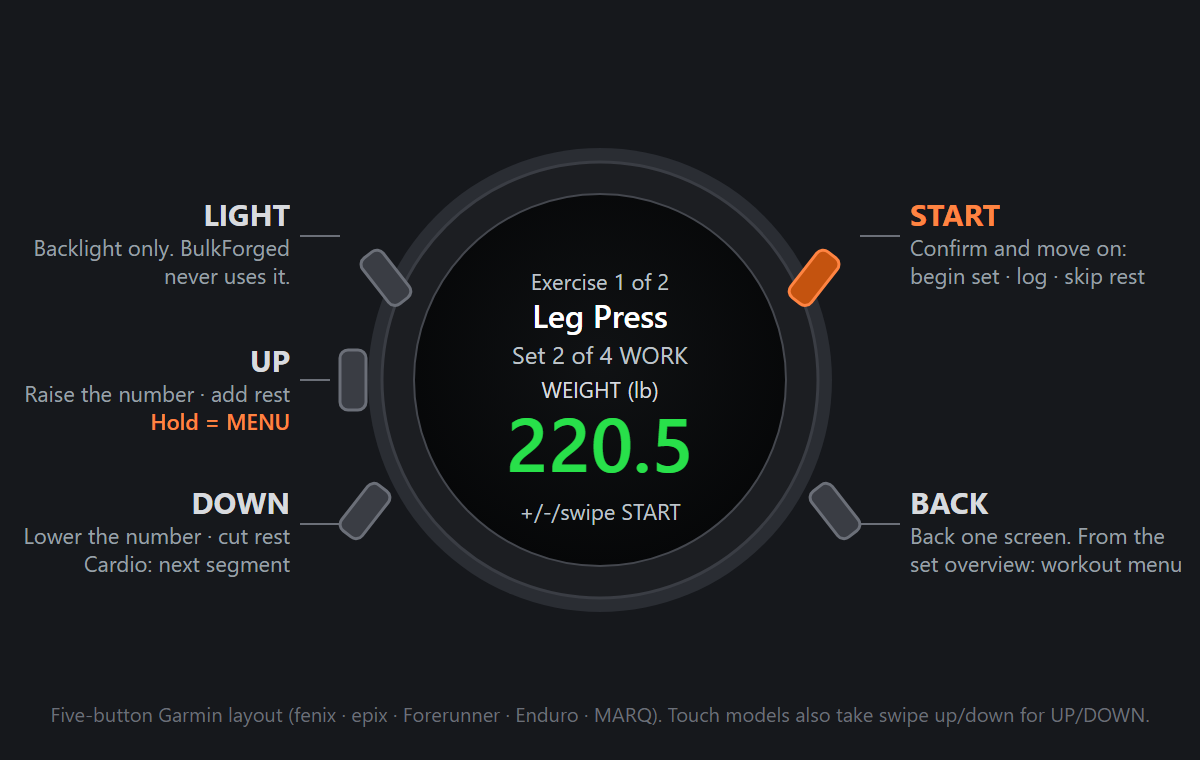
Every Instinct has five buttons, and BulkForged uses them the same way on every screen. The bezel prints its own names beside them: GPS is START, SET is BACK, MENU is UP, ABC is DOWN, and CTRL is the light.
- START (GPS) confirms and moves on: it begins a set, moves from weight to reps, logs the set, and skips the rest timer.
- UP (MENU) and DOWN (ABC) change the weight or reps.
- BACK (SET) steps back. From the set overview it opens the workout menu, where you can jump to another exercise.
How do I set it up on an Instinct?
- Install BulkForged on your Android phone from Google Play.
- Install the free BulkForged watch app on your Instinct from Garmin's Connect IQ store.
- In the phone app, open Settings, then Account & watch, then Add your watch, and tap Generate pairing code. Pairing needs a BulkForged account.
- On the watch, open BulkForged and choose Pair watch. Press UP or DOWN to set each digit of the code, and START to move to the next one.
- Start a routine from the watch.
Does it count my reps?
No. The reps start at your target, and you confirm what you did, so leg days and machines log as easily as curls. More in why your Garmin miscounts reps.
Does the workout show up in Garmin Connect?
Yes. A workout you run on the watch also saves to Garmin Connect as a strength training activity, with heart rate and calories. Your sets and weights stay in BulkForged. More in what's saved where.
What does it cost?
The watch app is free, and so is BulkForged's Basic plan: every workout, your history, your routines and your records. Coaching, which sets your next targets for you and shows why each one moved, is a paid plan after a 14-day preview. See what each plan includes.
Is there an iPhone app?
Not yet. BulkForged is Android only today. iPhone is coming soon. Join the waitlist.
Which other Garmin watches work?
Related: Adding your watch, Using your Garmin watch, The set overview screen on your watch, The rest timer on your watch.
Get BulkForged on Google PlayMore guides
- Best strength training apps for Garmin watches
- Does Hevy work with Garmin?
- Does Strong work with Garmin?
- Does StrongLifts work with Garmin?
- Does Fitbod work with Garmin?
- Does JEFIT work with Garmin?
- Does Caliber work with Garmin?
- Which workout apps set your next weight?
- Gravl vs BulkForged on a Garmin watch
- LiftTrack vs BulkForged on a Garmin watch
- How to log a gym workout on a Garmin watch
- Why your Garmin miscounts reps
- When should you add weight?
- How many sets per muscle per week?
- How to keep muscle while losing weight
- Which Garmin watches run BulkForged?
- Switching to BulkForged from Hevy or Strong
- One gym workout on a Garmin watch, press by press
- Questions to ask before you install
- BulkForged for iPhone: coming soon
- BulkForged and Garmin Connect: what's saved where
- How the watch and phone stay in sync during a workout
- Phone in the locker, workout on your Garmin
- Machine taken? Skip to another exercise
- How to track progressive overload on a Garmin
- Why Garmin Strength Coach skips some weights
- Fix Garmin Strength weights, names and sets
- Which Garmin watch is best for lifting?
- BulkForged on the fēnix
- BulkForged on the epix Pro
- BulkForged on the Forerunner
- BulkForged on the Instinct 3 AMOLED
- BulkForged on the Venu
- BulkForged on the vívoactive