How do I fix a Garmin Strength activity when weights don't save, exercise names are wrong or sets won't edit?
Turn on Edit Weight in the watch's Strength settings before you lift. Fix anything still wrong afterwards in Garmin Connect, using the web version if the phone app won't save.
Every fix below comes from Garmin's owner's manuals or Garmin's own forums, read on 4 October 2026. BulkForged is our app. It appears at the end, as a different route.
Which fix matches my problem?
| Problem | Likely cause | Fix |
|---|---|---|
| No weight on your sets | Edit Weight is off | Turn on Edit Weight |
| Weight reads "Body" | Watch picked a bodyweight move | Pick the weighted move, re-enter weight |
| Weight gone after a rename | New name is a bodyweight move | Choose the weighted version |
| Wrong exercise name | The watch guessed | Rename it in Garmin Connect |
| Exercise not in the list | Garmin's list lacks it | Pick the closest, add a note |
| Reps blank or wrong | Under 4 reps, or a leg lift | Edit reps after each set |
| Can't edit sets on the watch | Reported bug after the workout | Edit in Garmin Connect |
| App won't save your edit | Reported app bug | Edit on Garmin Connect web |
| Last week's weights not shown | Not a Garmin feature today | Put targets in a workout |
How do I make my Garmin ask for the weight after each set?
Garmin's fēnix 8 manual describes a setting called Edit Weight. It prompts you for the weight used in each set.
- From the watch face, press the upper-right button.
- Select Activities, then Strength. On a fēnix 8 it sits under Gym.
- Press the lower-left button and open the activity settings.
- Turn on Edit Weight.
Menus vary by model. Your own watch's manual has the exact path.
During the workout:
- Press the lower-right button to finish a set.
- Edit the reps and the weight before you start the next set.
- On a vívoactive 6, press the bottom button, then tap the edit icon to add the weight.
Following a workout you built in Garmin Connect? A Garmin staff reply on Garmin's forum suggests adding a rest step between exercises. You can enter reps and weight during that rest.
Why does my weight show as "Body" or disappear?
Lifters in Garmin's forums describe three causes.
- The watch picked a bodyweight move. In a fēnix 7 thread, a barbell back squat saved as "Squat" with "Bodyweight" as the weight.
- A rename dropped it. In a vívoactive 4 thread, choosing the right exercise in Garmin Connect deleted the weight.
- A planned workout carried the wrong weight. In a fēnix 7 and epix (Gen 2) thread, a bodyweight move showed the previous lift's weight.
What users report fixes it:
- When you rename a set, pick the weighted version, such as a weighted squat. Then re-enter the weight.
- In a planned workout with preset weights, users found the preset saved correctly with Edit Weight turned off.
Garmin staff asked affected users for details in two of these threads. Neither thread shows a final fix.
How do I correct sets after the workout?
A Garmin staff member gave this path in Garmin's Forerunner 955 forum:
- Open the activity in Garmin Connect.
- Scroll down and select Edit.
- Correct the reps and the weight for each set.
- Save when you are done.
If the phone app won't keep the change:
- Edit the activity on Garmin Connect in a web browser. Users in a recent iPhone thread report it saves there.
- One user saved a weight in the app by tapping the circle beside the set, then Edit.
Why does my Garmin show the wrong exercise name?
- In a free Strength activity, the watch fills in the exercise itself. Users often rename sets afterwards.
- To rename, open the activity in Garmin Connect, select Edit and choose the right exercise.
- To start with the right names, build a strength workout in Garmin Connect and send it to the watch. Its steps carry the exercises you picked.
- Garmin's exercise list may not hold your exact lift. Users have asked for custom exercises in Garmin's forums for years.
- If yours is missing, pick the closest exercise. In a workout you build, a step's note can hold the real name.
- Ask for a missing exercise through Garmin's ideas form. Garmin staff point users there.
Why can't I edit my sets?
It depends on where you try.
- On the watch, mid-workout. Garmin's fēnix 8 manual says to press the upper-right button to edit previous sets.
- On the watch, after the workout. A fēnix 8 owner reported that the Edit Sets list won't open a set. Garmin staff passed the report to its engineers.
- In the Garmin Connect app. Users report the edit button going missing, or edits not saving, after some app updates.
What users report helps:
- Update the app, or clear its cache and sign in again.
- Edit the activity on Garmin Connect in a web browser.
- If the activity saved as another type, change it to Strength, edit the sets, then change it back.
- On an iPhone, after searching for an exercise, clear the search text to get back to the activity.
Why are my reps wrong or missing?
Garmin's fēnix 8 and Forerunner 165 manuals set out the limits of rep counting:
- The count appears once you complete at least four reps.
- The watch counts one move per set. Finish the set before you change moves.
- A rep counts when the arm wearing the watch returns to its starting position.
- Leg exercises may not be counted.
Garmin's tips for a better count:
- Don't look at the watch during reps.
- Use a consistent, wide range of motion.
- Turn on Auto Set to start and stop sets for you.
- Correct the reps after each set. You can also turn Rep Counting off and type every count.
More detail: Why your Garmin miscounts reps.
Why don't last week's weights show on my watch?
- Garmin staff said in Garmin's forum that its watches don't offer this today. They pointed users to Garmin's ideas form.
- In Garmin Coach strength plans, only the primary lifts get a suggested weight, Garmin staff say. You set the rest.
- The workaround is a Garmin Connect workout with a target weight on each exercise. Update it yourself after each session.
- In a workout with repeated rounds, every round shares one weight and rep target, users report. Leave the weight blank and enter it as you lift.
Is there a way to confirm each set instead?
Yes. A Connect IQ watch app can hold your routine and show each set before you lift. You confirm what you did. Nothing depends on wrist movement.
BulkForged, our app, works this way.
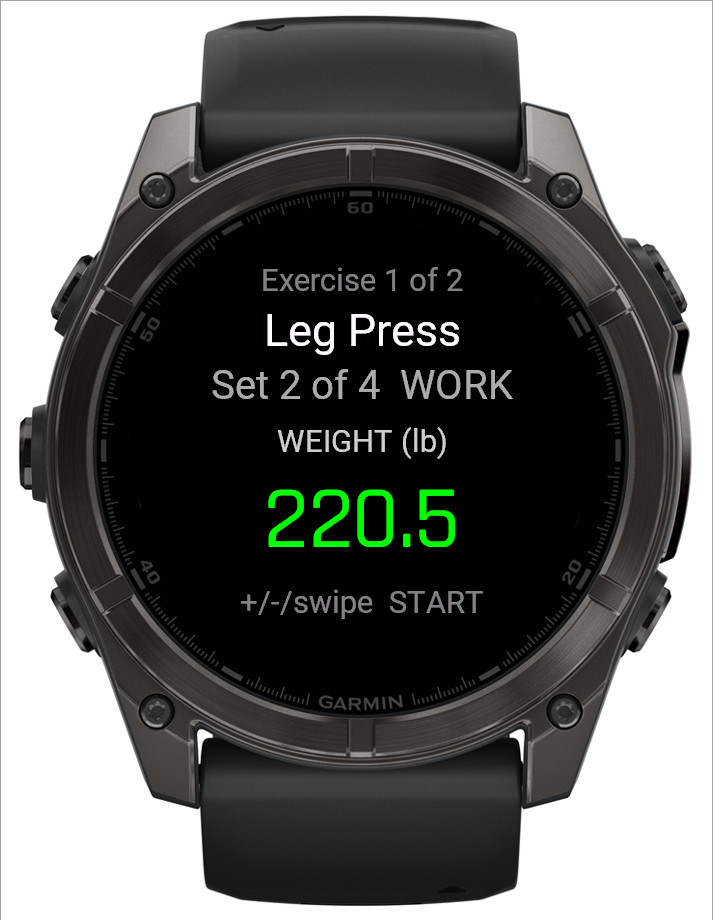
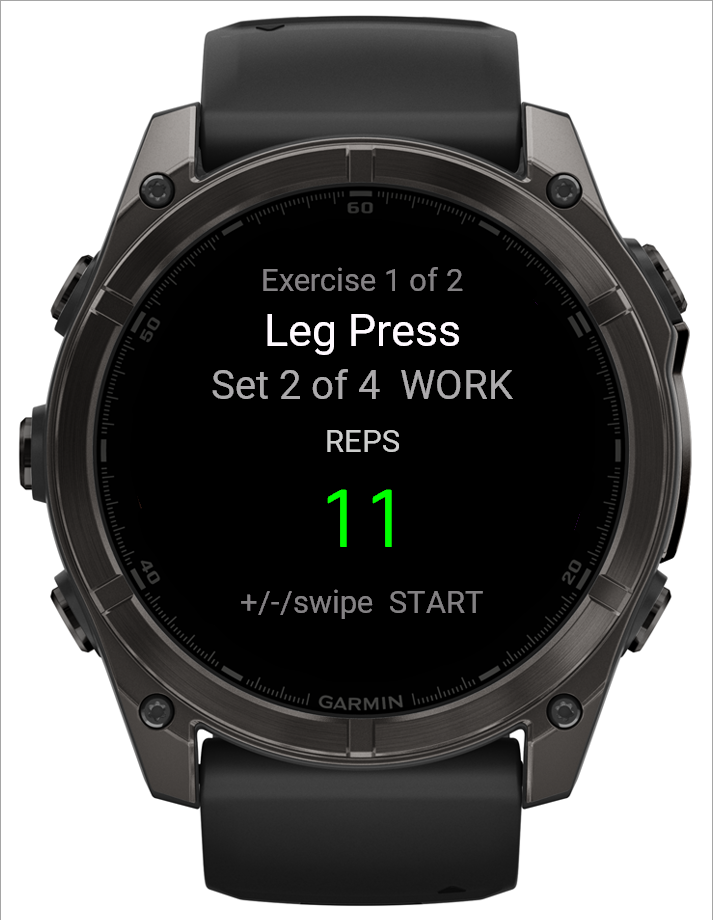
- The exercise name comes from your routine. The watch never guesses it.
- The weight starts on your target. UP and DOWN adjust it.
- The reps start on your target too. START logs the set.
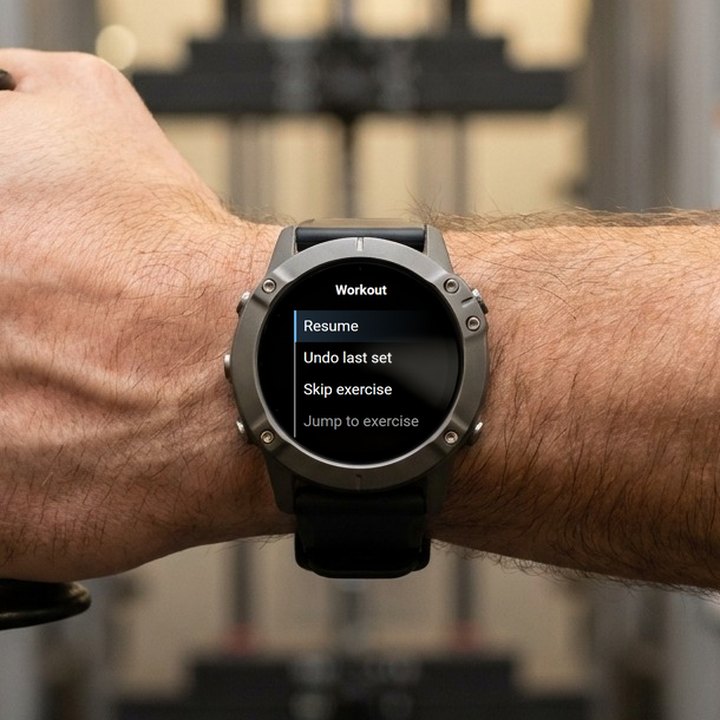
- Logged a set wrong? Undo last set, in the watch's workout menu, takes it back with your numbers still filled in.
- Any past session can be corrected on your phone afterwards.
- The watch runs the whole workout offline. It uploads the workout when it has a connection.
What it does with your weights:
- With Coaching, the paid plan, the app sets your next targets from the sets you logged.
- On the free Basic plan, you keep every workout, your history and your routines. Your targets stay where you set them.
- Coaching is open for your first 14 days at no charge.
See it on video: a whole exercise logged on a fēnix.
What are BulkForged's limits?
- Android only today. iPhone users can join the waitlist.
- It runs on 60+ Garmin watches. No Venu or vívoactive. See every supported model.
- Pairing the watch needs a BulkForged account. The phone app works without one.
- A BulkForged lifting session is saved in BulkForged, not as a Garmin Connect activity.
- It cannot edit or repair activities already in Garmin Connect. For those, use the fixes above.
Choosing a watch? See Which Garmin watch is best for weight lifting?
Related: The weight screen on your watch, The reps screen on your watch, The workout menu on your watch, Workout session detail, Using your Garmin watch.
Get BulkForged on Google PlayMore guides
- Best strength training apps for Garmin watches
- Does Hevy work with Garmin?
- Apps that raise your weights automatically
- How to log a gym workout on a Garmin watch
- Why your Garmin miscounts reps
- When should you add weight?
- How many sets per muscle per week?
- How to keep muscle while losing weight
- Which Garmin watches run BulkForged?
- Switching to BulkForged from Hevy or Strong
- One gym workout on a Garmin watch, press by press
- Questions to ask before you install
- BulkForged and Garmin Connect: what's saved where
- How the watch and phone stay in sync during a workout
- Phone in the locker, workout on your Garmin
- Machine taken? Skip to another exercise
- How to track progressive overload on a Garmin
- Why Garmin Strength Coach skips some weights
- Which Garmin watch is best for lifting?
- BulkForged on the fēnix 9
- BulkForged on the fēnix 8
- BulkForged on the epix Pro
- BulkForged on the Forerunner 970
- BulkForged on the Forerunner 965
- BulkForged on the Instinct 3 AMOLED